<?xml version="1.0" encoding="utf-8"?><feed xmlns="http://www.w3.org/2005/Atom" ><generator uri="https://jekyllrb.com/" version="4.4.1">Jekyll</generator><link href="https://lundie.io/feed.xml" rel="self" type="application/atom+xml" /><link href="https://lundie.io/" rel="alternate" type="text/html" /><updated>2026-09-25T13:18:54+00:00</updated><id>https://lundie.io/feed.xml</id><title type="html">Michael Lundie</title><subtitle>Engineering write-ups and build logs from Michael Lundie – threading, architecture, AI boundaries, and the decisions behind each project.</subtitle><author><name>Michael Lundie</name><email>hello@lundie.io</email></author><entry><title type="html">Na Fir-Chlis – theming i3 end-to-end in Nord</title><link href="https://lundie.io/blog/na-fir-chlis-theming-i3-in-nord" rel="alternate" type="text/html" title="Na Fir-Chlis – theming i3 end-to-end in Nord" /><published>2026-06-28T00:00:00+00:00</published><updated>2026-06-28T00:00:00+00:00</updated><id>https://lundie.io/blog/na-fir-chlis-theming-i3-in-nord</id><content type="html" xml:base="https://lundie.io/blog/na-fir-chlis-theming-i3-in-nord"><![CDATA[<p>I was still rocking a first-gen i7 with 8 GB of RAM when I first started taking Android development seriously.
I’ve since moved on, but if you were using Android Studio in the late twenty-teens, you’ll certainly remember the memes.
They still make me chuckle.</p>

<p>While that program no doubt sped up the end-of-life for my prized Dell Precision M6500 Covet (google it – I’m still in love), it did push me to finally move to Linux.
Being the masochist that I am, I chose Arch.
If you’re going to do something, you might as well do it with style – my style being to flail wildly towards the ground while debugging the latest update, without a parachute cord in sight.</p>

<p>Nevertheless, I’d found my forever-OS, and over the years my machines’ setups evolved.
After eight years, I finally present to you <strong>Na Fir-Chlis</strong>: an i3 setup on Arch (or your distro of choice), themed end-to-end in <a href="https://www.nordtheme.com/">Nord</a> and managed with <a href="https://www.gnu.org/software/stow/">GNU Stow</a>.</p>

<p>The <a href="https://github.com/michael-lundie/na-fir-chlis">repo read-me</a> is thorough – install, keybindings, every status block, the lot – so I won’t rehash it here.
What follows are a few notes.</p>

<hr />

<h2 id="mind-your-own-buffers">Mind Your Own Buffers</h2>

<p>You’ll notice almost nothing here themes your editor – nano aside.
That’s deliberate.
If you spend your day in Vim or an IDE, you already have strong opinions and a config tuned to within an inch of its life, and I’m not about to barge in with a symlink.</p>

<p>However, if you’ve got the one true Vim Nord theme to rule them all, open a <a href="https://github.com/michael-lundie/na-fir-chlis">PR</a> and we can wire it in as an optional package.
Same goes for anything else – fork it, take a piece, send a fix. The door’s open.</p>

<h2 id="pomodori-at-large">Pomodori at Large</h2>

<p>The bar ships with a pomodoro timer (supported by an included shell script) – it was something I lived by for many years.
When the struggle gets real on a technical problem, I still use it: I’m like a dog with a bone, and without the timer I’d run the risk of ossification. No engineer wants that.</p>

<p>Jesting aside, it’s the cheapest productivity trick I know.
Head down for twenty-five minutes followed by a short breather.
Having this habit a keybind away makes it easier to maintain flow.</p>

<div class="language-bash highlighter-rouge"><div class="highlight"><pre class="highlight"><code><table class="rouge-table"><tbody><tr><td class="rouge-gutter gl"><pre class="lineno">1
2
</pre></td><td class="rouge-code"><pre>pomodoro.sh start        <span class="c"># default: 25 minutes</span>
pomodoro.sh start 50     <span class="c"># or set your own</span>
</pre></td></tr></tbody></table></code></pre></div></div>

<h2 id="blank-desktop-space--the-final-frontier">Blank Desktop Space – The Final Frontier</h2>

<p>My own desktop usually sits bare – no wallpaper, no icons. Beginning with a metaphorical blank canvas – familiar and exciting – before a coding session suits my inner-artist.</p>

<p>On the other hand, my inner-designer refused to ship “formalised dotfiles” without the final touch.</p>

<p>The included wallpaper is one of my paintings, <em>Escape</em>.
Originally a greyscale notan piece, it was redesigned and recoloured into a Nord wallpaper and shipped in a few Polar Night shades. This way a fresh clone opens on something finished rather than my preferred “blank canvas”.</p>

<div class="history-callout">

  <p><em>A quick note</em></p>

  <p>The painting came from an experimental steganographic collection – the same body of work I built MetaMaker to manage (that’s a story for another day; the <a href="/project/metamaker">case study</a> has it).</p>

</div>

<p>Of course, if none of this is your cup of tea, you can easily change it – there’s a whole <a href="https://github.com/linuxdotexe/nordic-wallpapers">collection of Nord wallpapers</a> out there to swap in.</p>

<figure class="content-figure">
  <img src="/images/posts/na-fir-chlis/nord-i3-dmenu.png" alt="The Nord-themed dmenu launcher open over the Escape wallpaper" width="900" />
  
  <hr class="figure-divider" />
  <figcaption>The Nord-themed dmenu launcher, over the recoloured *Escape* wallpaper.</figcaption>
  
</figure>

<hr />

<p>That’s the workshop: small, a little stubborn, and held together with symlinks.</p>

<p>If you’d rather see what comes <em>out</em> of a setup like this than how it’s wired, <a href="/project/inpromptout">InPromptOut</a> is what I’ve been building lately – a better measure of the work than my choice of window manager.</p>]]></content><author><name>Michael Lundie</name><email>hello@lundie.io</email></author><category term="nord" /><category term="i3" /><category term="i3wm" /><category term="dotfiles" /><category term="arch-linux" /><category term="tiling-wm" /><category term="gnu-stow" /><category term="rice" /><summary type="html"><![CDATA[Eight years of an Arch i3 setup, finally formalised into Na Fir-Chlis: a Nord-themed dotfiles repo managed with GNU Stow. Plus a few notes the read-me can't carry – pomodori, a painted wallpaper, and why I left your editor alone.]]></summary><media:thumbnail xmlns:media="http://search.yahoo.com/mrss/" url="https://lundie.io/images/social/na-fir-chlis.png" /><media:content medium="image" url="https://lundie.io/images/social/na-fir-chlis.png" xmlns:media="http://search.yahoo.com/mrss/" /></entry><entry><title type="html">Inside MetaMaker – Refining Blinker for Robust, Testable Signals</title><link href="https://lundie.io/blog/metamaker-architecture-blinker-signals" rel="alternate" type="text/html" title="Inside MetaMaker – Refining Blinker for Robust, Testable Signals" /><published>2025-05-17T00:00:00+00:00</published><updated>2025-05-17T00:00:00+00:00</updated><id>https://lundie.io/blog/metamaker-architecture-blinker-signals</id><content type="html" xml:base="https://lundie.io/blog/metamaker-architecture-blinker-signals"><![CDATA[<h2 id="introduction">Introduction</h2>

<p>I enjoy refactoring code after a period of deep learning – it is often when my biggest architectural realisations land. Coming back to MetaMaker, a Python desktop application originally built around file metadata and Darkblock<sup id="fnref:1"><a href="#fn:1" class="footnote" rel="footnote" role="doc-noteref">1</a></sup> upload workflows for an experimental steganographic art collection of my own paintings, I saw room to refine how its components communicated internally.</p>

<p>MetaMaker used an event-driven MVC architecture. To decouple components and standardise event handling, I introduced Blinker<sup id="fnref:5"><a href="#fn:5" class="footnote" rel="footnote" role="doc-noteref">2</a></sup>, a lightweight Python library for dispatching signals. This post focuses on how I hardened that signal layer: introducing explicit payload classes, enforcing runtime payload contracts, and adopting a hybrid object + ID pattern to balance responsiveness against reliability.</p>

<p>The main MetaMaker case study covers the wider architecture; this post focuses specifically on how the event layer evolved. Coming from a Java background, the process also helped me settle into a more Pythonic and maintainable approach to event-driven design.</p>

<hr />

<h2 id="introducing-event-payloads">Introducing Event Payloads</h2>

<p>Early in the Blinker rollout, signal emissions were simple:</p>

<div class="language-python highlighter-rouge"><div class="highlight"><pre class="highlight"><code><table class="rouge-table"><tbody><tr><td class="rouge-gutter gl"><pre class="lineno">1
</pre></td><td class="rouge-code"><pre><span class="n">set_manager_on_updated</span><span class="p">.</span><span class="nf">send</span><span class="p">(</span><span class="n">self</span><span class="p">,</span> <span class="n">payload</span><span class="o">=</span><span class="n">nft_set</span><span class="p">)</span>
</pre></td></tr></tbody></table></code></pre></div></div>

<p>The trouble was structure. Objects were passed informally, with no defined schema and no type safety. As the system grew, that ambiguity made payloads harder to validate, handlers harder to test, and signal flow harder to trace across components.</p>

<p>To address this, I introduced explicit payload classes using <code class="language-plaintext highlighter-rouge">@dataclass</code><sup id="fnref:27"><a href="#fn:27" class="footnote" rel="footnote" role="doc-noteref">3</a></sup>:</p>

<div class="language-python highlighter-rouge"><div class="highlight"><pre class="highlight"><code><table class="rouge-table"><tbody><tr><td class="rouge-gutter gl"><pre class="lineno">1
2
3
4
5
6
7
8
</pre></td><td class="rouge-code"><pre><span class="nd">@dataclass</span>
<span class="k">class</span> <span class="nc">SetUpdatedEvent</span><span class="p">:</span>
    <span class="n">nft_set</span><span class="p">:</span> <span class="sh">'</span><span class="s">NftMetadataSet</span><span class="sh">'</span>
    <span class="n">set_id</span><span class="p">:</span> <span class="nb">int</span>

<span class="k">def</span> <span class="nf">emit_set_updated</span><span class="p">(</span><span class="n">sender</span><span class="p">,</span> <span class="n">nft_set</span><span class="p">):</span>
    <span class="n">payload</span> <span class="o">=</span> <span class="nc">SetUpdatedEvent</span><span class="p">(</span><span class="n">nft_set</span><span class="o">=</span><span class="n">nft_set</span><span class="p">,</span> <span class="n">set_id</span><span class="o">=</span><span class="n">nft_set</span><span class="p">.</span><span class="nb">id</span><span class="p">)</span>
    <span class="n">set_manager_on_updated</span><span class="p">.</span><span class="nf">send</span><span class="p">(</span><span class="n">sender</span><span class="p">,</span> <span class="n">payload</span><span class="o">=</span><span class="n">payload</span><span class="p">)</span>
</pre></td></tr></tbody></table></code></pre></div></div>

<p><strong>Benefit:</strong> handlers can access fields predictably (<code class="language-plaintext highlighter-rouge">payload.set_id</code>, <code class="language-plaintext highlighter-rouge">payload.nft_set.name</code>), and the code becomes easier to read and refactor.</p>

<p>Formalising events this way led me to a broader architectural question: should I really be passing full objects around, and was I violating the “single source of truth” principle by doing so?</p>

<hr />

<h2 id="the-single-source-of-truth-principle">The “Single Source of Truth” Principle</h2>

<p>Conventionally, data should be re-fetched from the database (the repository) to ensure it is current, especially in multi-threaded<sup id="fnref:7"><a href="#fn:7" class="footnote" rel="footnote" role="doc-noteref">4</a></sup> or distributed systems.</p>

<p>In MetaMaker’s case, that convention did not always make sense. When emitting a signal immediately after writing to the database, I already had the “truth” in memory. Forcing handlers to re-query that data introduced latency and redundant work – defeating the responsiveness goals of the UI layer.</p>

<p>The hybrid approach struck a balance:</p>

<ul>
  <li><strong>IDs</strong> preserve the ability to re-fetch the authoritative state when needed.</li>
  <li><strong>Object references</strong> allow fast, contextual responses in the UI – without assuming they are immutable or canonical.</li>
  <li><strong>Event classes</strong> (like <code class="language-plaintext highlighter-rouge">SetUpdatedEvent</code>) formalise this structure, making the trade-off clear and auditable.</li>
</ul>

<div class="history-callout">

  <p><strong>Takeaway:</strong></p>

  <p>Convention is a guide and not a rule. When you deviate from it, the key is to do so transparently – with structure and safeguards in place.</p>

</div>

<h2 id="the-hybrid-payload-model-object--id">The Hybrid Payload Model: Object + ID</h2>

<p>By wrapping both the object and its ID in a structured dataclass (e.g. <code class="language-plaintext highlighter-rouge">DblockUpdatedEvent</code>), I gained:</p>

<ul>
  <li><strong>Immediate UI access</strong> to object data (<code class="language-plaintext highlighter-rouge">payload.nft_set.name</code>)</li>
  <li><strong>Optional DB refresh</strong> when needed (<code class="language-plaintext highlighter-rouge">darkblockmanager.get_dblock(dblockid=42)</code><sup id="fnref:19"><a href="#fn:19" class="footnote" rel="footnote" role="doc-noteref">5</a></sup>)</li>
  <li><strong>Runtime payload contracts</strong> for debugging and handler validation</li>
  <li><strong>Cleaner testing</strong>, using mock event payloads and signal assertions</li>
</ul>

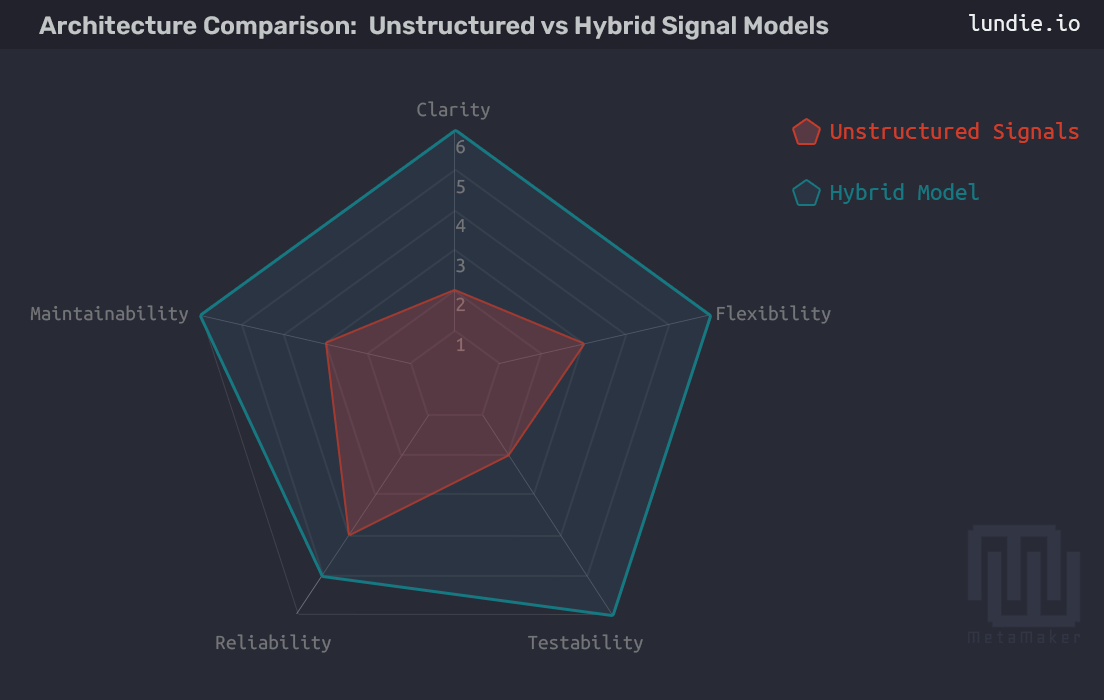
<p>This resolved several pain points at once. It preserved the responsiveness of object-based signalling while introducing the structure and reliability needed to scale. With hybrid payloads, handlers can now:</p>

<ol>
  <li>Update UI elements immediately from object attributes (<code class="language-plaintext highlighter-rouge">payload.nft_set.name</code>)</li>
  <li>Fetch fresh state only when needed (<code class="language-plaintext highlighter-rouge">darkblockmanager.get_dblock(dblockid=42)</code>)</li>
</ol>

<div class="gallery full-width" data-columns="2"><img src="/images/projects/metamaker/metamaker-architecture-walkthrough-hybridSignals-radar.png" alt="Inside MetaMaker – Refining Blinker for Robust, Testable Signals" loading="lazy" decoding="async" /></div>

<div class="history-callout">

  <p><strong>Takeaway:</strong></p>

  <p>The hybrid model offers flexibility: immediate access when speed matters and strict consistency when correctness does.</p>

</div>

<hr />

<h2 id="enforcing-runtime-payload-contracts">Enforcing Runtime Payload Contracts</h2>

<p>To guard against accidental signal misuse, I added a decorator that validates payload types when an environment flag is set:</p>

<div class="language-python highlighter-rouge"><div class="highlight"><pre class="highlight"><code><table class="rouge-table"><tbody><tr><td class="rouge-gutter gl"><pre class="lineno">1
2
3
4
5
6
7
8
9
10
11
</pre></td><td class="rouge-code"><pre><span class="k">def</span> <span class="nf">enforce_contract</span><span class="p">(</span><span class="n">signal_name</span><span class="p">,</span> <span class="n">expected_type</span><span class="p">):</span>
    <span class="k">def</span> <span class="nf">decorator</span><span class="p">(</span><span class="n">func</span><span class="p">):</span>
        <span class="nd">@wraps</span><span class="p">(</span><span class="n">func</span><span class="p">)</span>
        <span class="k">def</span> <span class="nf">wrapper</span><span class="p">(</span><span class="n">sender</span><span class="p">,</span> <span class="o">**</span><span class="n">kwargs</span><span class="p">):</span>
            <span class="k">if</span> <span class="n">os</span><span class="p">.</span><span class="nf">getenv</span><span class="p">(</span><span class="sh">"</span><span class="s">DEBUG_SIGNALS</span><span class="sh">"</span><span class="p">)</span> <span class="o">==</span> <span class="sh">"</span><span class="s">1</span><span class="sh">"</span><span class="p">:</span>
                <span class="n">payload</span> <span class="o">=</span> <span class="n">kwargs</span><span class="p">.</span><span class="nf">get</span><span class="p">(</span><span class="sh">'</span><span class="s">payload</span><span class="sh">'</span><span class="p">)</span>
                <span class="k">if</span> <span class="ow">not</span> <span class="nf">isinstance</span><span class="p">(</span><span class="n">payload</span><span class="p">,</span> <span class="n">expected_type</span><span class="p">):</span>
                    <span class="k">raise</span> <span class="nc">TypeError</span><span class="p">(</span><span class="sa">f</span><span class="sh">"</span><span class="s">Signal </span><span class="sh">'</span><span class="si">{</span><span class="n">signal_name</span><span class="si">}</span><span class="sh">'</span><span class="s"> expected </span><span class="si">{</span><span class="n">expected_type</span><span class="p">.</span><span class="n">__name__</span><span class="si">}</span><span class="sh">"</span><span class="p">)</span>
            <span class="k">return</span> <span class="nf">func</span><span class="p">(</span><span class="n">sender</span><span class="p">,</span> <span class="o">**</span><span class="n">kwargs</span><span class="p">)</span>
        <span class="k">return</span> <span class="n">wrapper</span>
    <span class="k">return</span> <span class="n">decorator</span>
</pre></td></tr></tbody></table></code></pre></div></div>

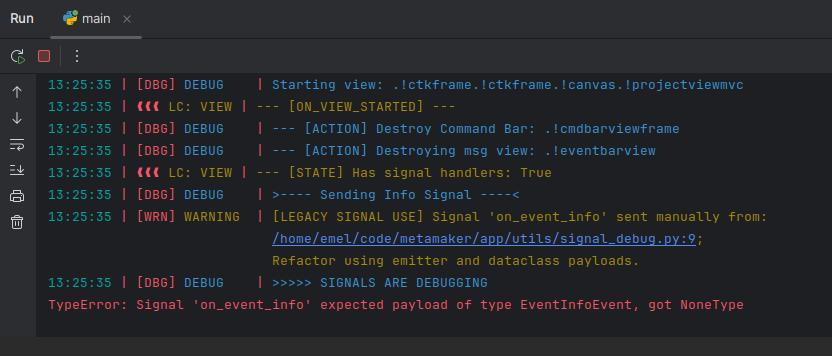
<p>This let me catch mistakes safely during development, with no production overhead. To reinforce it, I also temporarily patched <code class="language-plaintext highlighter-rouge">Signal.send</code> to flag any legacy manual emissions:</p>

<div class="language-python highlighter-rouge"><div class="highlight"><pre class="highlight"><code><table class="rouge-table"><tbody><tr><td class="rouge-gutter gl"><pre class="lineno">1
2
3
4
5
6
7
8
9
10
11
12
13
</pre></td><td class="rouge-code"><pre><span class="k">def</span> <span class="nf">patched_send</span><span class="p">(</span><span class="n">self</span><span class="p">,</span> <span class="o">*</span><span class="n">args</span><span class="p">,</span> <span class="o">**</span><span class="n">kwargs</span><span class="p">):</span>
    <span class="n">stack</span> <span class="o">=</span> <span class="n">inspect</span><span class="p">.</span><span class="nf">stack</span><span class="p">()</span>
    <span class="k">if</span> <span class="ow">not</span> <span class="nf">any</span><span class="p">(</span><span class="sh">"</span><span class="s">emit_</span><span class="sh">"</span> <span class="ow">in</span> <span class="n">frame</span><span class="p">.</span><span class="n">function</span> <span class="k">for</span> <span class="n">frame</span> <span class="ow">in</span> <span class="n">stack</span><span class="p">):</span>
        <span class="n">caller</span> <span class="o">=</span> <span class="nf">next</span><span class="p">((</span><span class="n">f</span> <span class="k">for</span> <span class="n">f</span> <span class="ow">in</span> <span class="n">stack</span> <span class="k">if</span> <span class="sh">"</span><span class="s">emit_</span><span class="sh">"</span> <span class="ow">not</span> <span class="ow">in</span> <span class="n">f</span><span class="p">.</span><span class="n">function</span><span class="p">),</span> <span class="bp">None</span><span class="p">)</span>
        <span class="k">if</span> <span class="n">caller</span><span class="p">:</span>
            <span class="n">logger</span><span class="p">.</span><span class="nf">warning</span><span class="p">(</span>
                <span class="sa">f</span><span class="sh">"</span><span class="s">[LEGACY SIGNAL USE] Signal </span><span class="sh">'</span><span class="si">{</span><span class="n">self</span><span class="p">.</span><span class="n">name</span><span class="si">}</span><span class="sh">'</span><span class="s"> sent manually from: </span><span class="se">\n</span><span class="sh">"</span>
                <span class="sa">f</span><span class="sh">"</span><span class="si">{</span><span class="n">caller</span><span class="p">.</span><span class="n">filename</span><span class="si">}</span><span class="s">:</span><span class="si">{</span><span class="n">caller</span><span class="p">.</span><span class="n">lineno</span><span class="si">}</span><span class="s">; </span><span class="se">\n</span><span class="s"> Refactor using emitter and dataclass payloads.</span><span class="sh">"</span>
            <span class="p">)</span>
    <span class="k">return</span> <span class="nf">_original_send</span><span class="p">(</span><span class="n">self</span><span class="p">,</span> <span class="o">*</span><span class="n">args</span><span class="p">,</span> <span class="o">**</span><span class="n">kwargs</span><span class="p">)</span>

<span class="k">if</span> <span class="n">os</span><span class="p">.</span><span class="nf">getenv</span><span class="p">(</span><span class="sh">"</span><span class="s">DEBUG_SIGNALS</span><span class="sh">"</span><span class="p">,</span> <span class="sh">"</span><span class="s">1</span><span class="sh">"</span><span class="p">)</span> <span class="o">==</span> <span class="sh">"</span><span class="s">1</span><span class="sh">"</span><span class="p">:</span>
    <span class="n">Signal</span><span class="p">.</span><span class="n">send</span> <span class="o">=</span> <span class="n">patched_send</span>
</pre></td></tr></tbody></table></code></pre></div></div>

<div class="gallery " data-columns="1"><img src="/images/projects/metamaker/metamaker-architecture-mvcAndBlinker-log.png" alt="Inside MetaMaker – Refining Blinker for Robust, Testable Signals" loading="lazy" decoding="async" /></div>

<div class="history-callout">

  <p><strong>Takeaway:</strong></p>

  <p>This log snapshot captures the lifecycle of a view initialisation. It surfaces a legacy signal warning – thanks to monkey-patching <code class="language-plaintext highlighter-rouge">Signal.send</code> – and shows a <code class="language-plaintext highlighter-rouge">TypeError</code> enforcing the expected payload structure.</p>

</div>

<hr />

<h2 id="testing-strategy">Testing Strategy</h2>

<p>To keep the system reliable, I settled on a consistent testing approach for signals.</p>

<h3 id="use-fake-payloads">Use fake payloads</h3>

<div class="language-python highlighter-rouge"><div class="highlight"><pre class="highlight"><code><table class="rouge-table"><tbody><tr><td class="rouge-gutter gl"><pre class="lineno">1
2
3
4
</pre></td><td class="rouge-code"><pre><span class="k">class</span> <span class="nc">FakeNftMetadataSet</span><span class="p">:</span>
    <span class="k">def</span> <span class="nf">__init__</span><span class="p">(</span><span class="n">self</span><span class="p">,</span> <span class="nb">id</span><span class="p">):</span>
        <span class="n">self</span><span class="p">.</span><span class="nb">id</span> <span class="o">=</span> <span class="nb">id</span>
        <span class="n">self</span><span class="p">.</span><span class="n">name</span> <span class="o">=</span> <span class="sh">"</span><span class="s">Test</span><span class="sh">"</span>
</pre></td></tr></tbody></table></code></pre></div></div>

<h3 id="patch-the-environment">Patch the environment</h3>

<div class="language-python highlighter-rouge"><div class="highlight"><pre class="highlight"><code><table class="rouge-table"><tbody><tr><td class="rouge-gutter gl"><pre class="lineno">1
2
3
4
5
6
</pre></td><td class="rouge-code"><pre><span class="n">invalid_payloads</span> <span class="o">=</span> <span class="p">[(</span><span class="sh">"</span><span class="s">string</span><span class="sh">"</span><span class="p">,</span> <span class="sh">"</span><span class="s">invalid</span><span class="sh">"</span><span class="p">),</span> <span class="p">(</span><span class="sh">"</span><span class="s">none</span><span class="sh">"</span><span class="p">,</span> <span class="bp">None</span><span class="p">)]</span>
<span class="k">with</span> <span class="n">patch</span><span class="p">.</span><span class="nf">dict</span><span class="p">(</span><span class="sh">'</span><span class="s">os.environ</span><span class="sh">'</span><span class="p">,</span> <span class="p">{</span><span class="sh">'</span><span class="s">DEBUG_SIGNALS</span><span class="sh">'</span><span class="p">:</span> <span class="sh">'</span><span class="s">1</span><span class="sh">'</span><span class="p">}):</span>
    <span class="k">for</span> <span class="n">case_name</span><span class="p">,</span> <span class="n">payload</span> <span class="ow">in</span> <span class="n">invalid_payloads</span><span class="p">:</span>
        <span class="k">with</span> <span class="n">self</span><span class="p">.</span><span class="nf">subTest</span><span class="p">(</span><span class="n">case</span><span class="o">=</span><span class="n">case_name</span><span class="p">):</span>
            <span class="k">with</span> <span class="n">self</span><span class="p">.</span><span class="nf">assertRaises</span><span class="p">(</span><span class="nb">TypeError</span><span class="p">):</span>
                <span class="nf">handler</span><span class="p">(</span><span class="bp">None</span><span class="p">,</span> <span class="n">payload</span><span class="o">=</span><span class="n">payload</span><span class="p">)</span>
</pre></td></tr></tbody></table></code></pre></div></div>

<p>This enforces signal contracts during testing, with minimal noise and clear subtest isolation.</p>

<h3 id="clean-up-handlers">Clean up handlers</h3>

<p>Handlers persist across tests unless removed:</p>

<div class="language-python highlighter-rouge"><div class="highlight"><pre class="highlight"><code><table class="rouge-table"><tbody><tr><td class="rouge-gutter gl"><pre class="lineno">1
2
3
4
5
</pre></td><td class="rouge-code"><pre><span class="k">def</span> <span class="nf">tearDown</span><span class="p">(</span><span class="n">self</span><span class="p">):</span>
    <span class="k">for</span> <span class="n">signal</span> <span class="ow">in</span> <span class="n">self</span><span class="p">.</span><span class="n">ALL_SIGNALS</span><span class="p">:</span>
        <span class="k">for</span> <span class="n">receiver</span> <span class="ow">in</span> <span class="n">signal</span><span class="p">.</span><span class="n">receivers</span><span class="p">.</span><span class="nf">values</span><span class="p">():</span>
            <span class="n">signal</span><span class="p">.</span><span class="nf">disconnect</span><span class="p">(</span><span class="n">receiver</span><span class="p">)</span>
    <span class="n">self</span><span class="p">.</span><span class="n">handlers</span><span class="p">.</span><span class="nf">clear</span><span class="p">()</span>
</pre></td></tr></tbody></table></code></pre></div></div>

<p>Together, these steps made the signal system reliable and testable, even during concurrency-heavy operations.</p>

<hr />

<h2 id="looking-back">Looking Back</h2>

<p>MetaMaker is now archived as a portfolio project, so I would not continue this migration for its own sake. If I were rebuilding the architecture today, I would either standardise the remaining listener-based paths around Blinker or deliberately keep them separate as a smaller async-result boundary.</p>

<p>The important lesson was not “use Blinker everywhere.” It was that event-driven code needs structure. Named payloads, explicit emit functions, runtime contracts, and predictable cleanup turned a loose signal layer into something easier to test, trace, and refactor.</p>

<hr />

<h2 id="metamaker--next-steps">MetaMaker – Next Steps</h2>

<p>For the full picture on this project, read the <a href="/project/metamaker">MetaMaker case study</a>, or browse the <a href="https://github.com/michael-lundie/metamaker">code on GitHub</a>.</p>

<p>Or, since you have read this far – a choice:</p>

<p><a class="related-project" href="/project/inpromptout" style="--rp-image: url('/images/projects/inpromptout/inpromptout-feature.webp'); --rp-accent: #DE4949;">
<span class="related-project__media" aria-hidden="true"></span>
<span class="related-project__content"><span class="related-project__eyebrow">Case study</span>
<span class="related-project__title">InPromptOut</span>
<span class="related-project__desc">My latest and most rigorous case study: graph modelling, a performance crisis, a security audit and cost-safety work. See how deep the architecture goes.</span>
<span class="related-project__cue">Explore</span>
</span>
</a></p>

<div class="choice-or"><span>or</span></div>

<p><a class="related-project" href="/project/phonixlab" style="--rp-image: url('/images/projects/phonixlab/phonixlab-hero.webp'); --rp-accent: #7C5BD9;">
<span class="related-project__media" aria-hidden="true"></span>
<span class="related-project__content"><span class="related-project__eyebrow">Case study</span>
<span class="related-project__title">PhonixLab</span>
<span class="related-project__desc">A live classroom phonics platform, in daily use across an eleven-school education board. Step into a project running in the real world.</span>
<span class="related-project__cue">Take a look</span>
</span>
</a></p>

<hr />

<h2 id="lets-connect">Let’s Connect</h2>

<p>If you are interested in event-driven Python architecture, or want to talk about signal layers, typed payloads, or testing event-driven systems, I’d be glad to hear from you.</p>

<div class="inline-connect">
<button type="button" class="connect-link connect-link--email inline-connect__trigger js-contact-inline" aria-expanded="false" aria-controls="inline-connect-mount">
<span class="connect-link__icon"><svg xmlns="http://www.w3.org/2000/svg" viewBox="0 0 24 24" fill="none" stroke="currentColor" stroke-width="1.6" stroke-linecap="round" stroke-linejoin="round" aria-hidden="true" focusable="false"><rect x="2" y="4" width="20" height="16" rx="2" /><path d="m2 7 10 6 10-6" /></svg>
</span>
<span class="connect-link__body">
<span class="connect-link__label">Send a message</span>
<span class="connect-link__text">Reach out and I'll get back to you</span>
</span>
</button>
<p class="inline-connect__fallback">Prefer to email me directly? <a href="mailto:hello@lundie.io">hello@lundie.io</a></p>
<div class="inline-connect__mount" id="inline-connect-mount"></div>

<template id="inline-contact-template">
<div class="contact__wrap contact__wrap--inline">
<form method="POST" action="https://formspree.io/f/mqeoenjz" class="contact__form">
<div class="input-group">
<label for="name-inline">Your Name</label>
<input type="text" name="name" id="name-inline" placeholder="What should I call you?" required="" />
</div>
<div class="input-group">
<label for="email-inline">Your Email</label>
<input type="email" name="email" id="email-inline" placeholder="What's your email address?" required="" />
</div>
<div class="input-group">
<label for="message-inline">Your Message</label>
<textarea name="message" id="message-inline" placeholder="What's on your mind?" rows="4" required=""></textarea>
</div>
<input type="hidden" name="_next" value="https://lundie.io/thanks" />
<input type="hidden" name="_subject" value="Contact form submission" />
<input type="text" name="_gotcha" style="display: none;" class="contact-form__gotcha" value="" tabindex="-1" autocomplete="off" />
<div class="input-submit">
<input type="submit" class="button--fill" value="Send Message" />
</div>
</form>
<p class="contact__feedback contact__feedback--success" role="status" hidden="">
Thanks – your message is on its way. I'll get back to you soon.
</p>
<p class="contact__feedback contact__feedback--error" role="alert" hidden="">
Something went wrong sending that. Please try again, or email me directly at
<a href="mailto:hello@lundie.io">hello@lundie.io</a>.
</p>
</div>
</template>
</div>

<hr />
<div class="footnotes" role="doc-endnotes">
  <ol>
    <li id="fn:1">
      <p><a href="https://www.darkblock.io/">Darkblock</a> is a service for attaching encrypted, unlockable content to digital assets. <a href="#fnref:1" class="reversefootnote" role="doc-backlink">&#8617;</a></p>
    </li>
    <li id="fn:5">
      <p><a href="https://en.wikipedia.org/wiki/Event-driven_programming">Event-Driven Programming</a> is a design pattern where components react to events; Blinker is a Python library that enables this through signals. <a href="#fnref:5" class="reversefootnote" role="doc-backlink">&#8617;</a></p>
    </li>
    <li id="fn:27">
      <p><a href="https://docs.python.org/3/library/dataclasses.html"><code class="language-plaintext highlighter-rouge">@dataclass</code></a> is a decorator in Python that automatically generates special methods like <code class="language-plaintext highlighter-rouge">__init__</code>, <code class="language-plaintext highlighter-rouge">__repr__</code>, and <code class="language-plaintext highlighter-rouge">__eq__</code> for classes used primarily to store data. <a href="#fnref:27" class="reversefootnote" role="doc-backlink">&#8617;</a></p>
    </li>
    <li id="fn:7">
      <p><a href="https://en.wikipedia.org/wiki/Thread_(computing)">Multithreading</a> allows multiple tasks to run concurrently, improving responsiveness in applications like MetaMaker. <a href="#fnref:7" class="reversefootnote" role="doc-backlink">&#8617;</a></p>
    </li>
    <li id="fn:19">
      <p>DarkblockManager is a custom manager class responsible for updating the database with Darkblock transaction data and emitting signals. <a href="#fnref:19" class="reversefootnote" role="doc-backlink">&#8617;</a></p>
    </li>
  </ol>
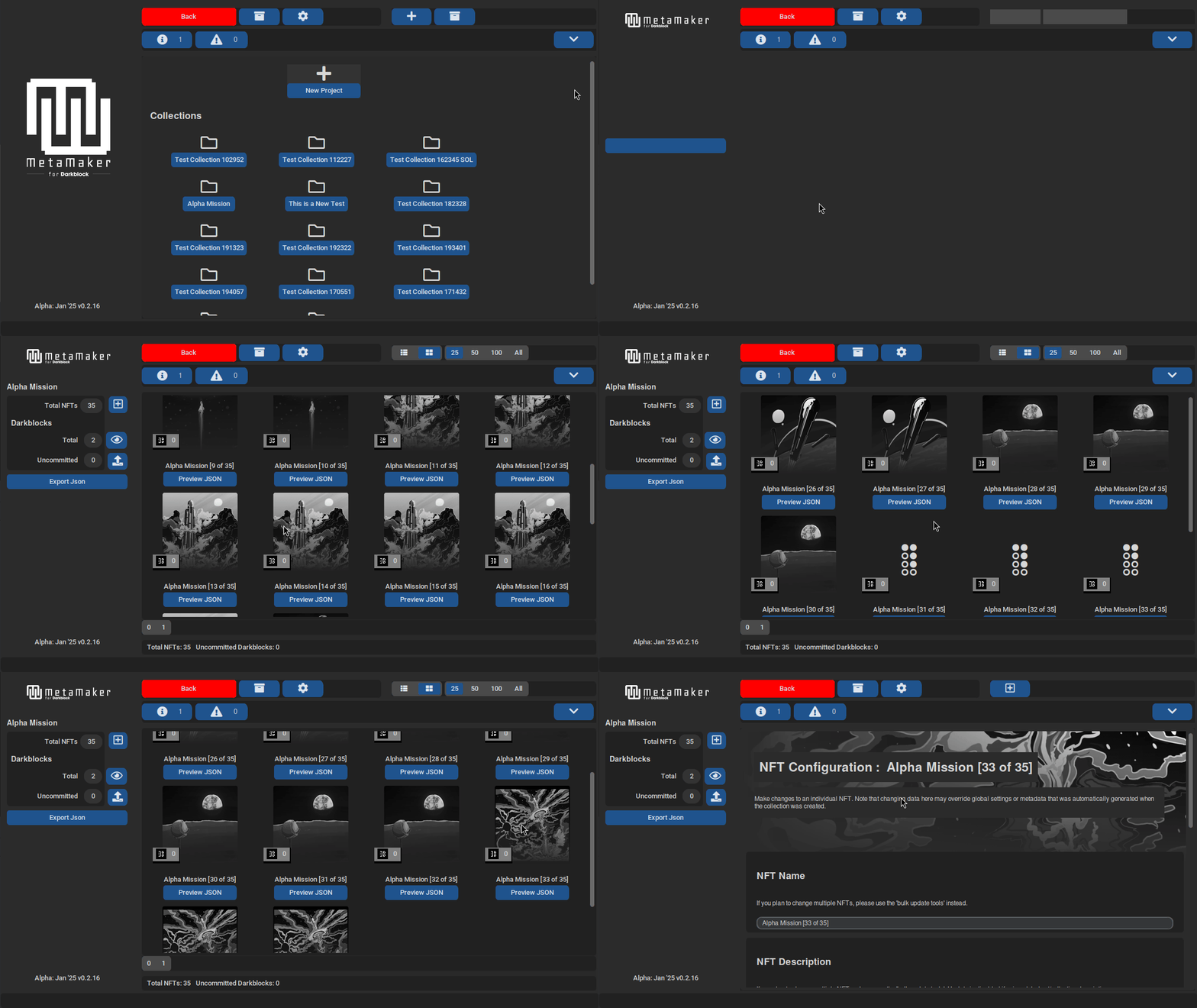
</div>]]></content><author><name>Michael Lundie</name><email>hello@lundie.io</email></author><category term="python" /><category term="tkinter" /><category term="mvc" /><category term="sqlalchemy" /><category term="blinker" /><category term="event-driven-programming" /><category term="dependency-injection" /><category term="desktop-development" /><summary type="html"><![CDATA[How I hardened MetaMaker's Blinker event layer – introducing typed payload classes, a hybrid object + ID pattern, and runtime signal contracts to make event-driven updates safer and easier to test.]]></summary><media:thumbnail xmlns:media="http://search.yahoo.com/mrss/" url="https://lundie.io/images/social/metamaker-blinker-signals.png" /><media:content medium="image" url="https://lundie.io/images/social/metamaker-blinker-signals.png" xmlns:media="http://search.yahoo.com/mrss/" /></entry><entry><title type="html">Inside MetaMaker – A Walkthrough of Architectural Decisions</title><link href="https://lundie.io/blog/metamaker-architectural-decisions-walkthrough" rel="alternate" type="text/html" title="Inside MetaMaker – A Walkthrough of Architectural Decisions" /><published>2025-03-18T00:00:00+00:00</published><updated>2025-03-18T00:00:00+00:00</updated><id>https://lundie.io/blog/metamaker-architectural-decisions-walkthrough</id><content type="html" xml:base="https://lundie.io/blog/metamaker-architectural-decisions-walkthrough"><![CDATA[<p><em>MetaMaker’s collection gallery, showcasing modular UI rendering with <code class="language-plaintext highlighter-rouge">CustomTkinter</code>.</em></p>

<hr />

<h2 id="introduction">Introduction</h2>

<p>MetaMaker grew from a simple command-line tool for the Darkblock<sup id="fnref:1"><a href="#fn:1" class="footnote" rel="footnote" role="doc-noteref">1</a></sup> API into an open-source, cross-platform desktop app for managing file metadata and Darkblock upload workflows, running on Linux, Windows and Mac. Coming from a Java background, I had habits to unlearn – my early code was verbose, reflecting a Java mindset. Embracing Pythonic simplicity, MetaMaker became my proving ground for a modular, maintainable architecture.</p>

<p>This post covers the key decisions: MVC for separation of concerns, Blinker<sup id="fnref:5"><a href="#fn:5" class="footnote" rel="footnote" role="doc-noteref">2</a></sup> for event-driven updates, and manual dependency injection<sup id="fnref:6"><a href="#fn:6" class="footnote" rel="footnote" role="doc-noteref">3</a></sup> for flexibility – with code examples and the lessons behind them. For the broader picture, see the <a href="/project/metamaker">MetaMaker case study</a>, or explore concurrency in the <a href="/blog/metamaker-threading-deep-dive">Threading Deep Dive</a>.</p>

<hr />

<h2 id="quick-navigation">Quick Navigation</h2>

<ul>
  <li><a href="#choosing-mvc-for-separation-of-concerns">Choosing MVC for Separation of Concerns</a></li>
  <li><a href="#building-an-event-driven-system-with-blinker">Building an Event-Driven System with Blinker</a></li>
  <li><a href="#manual-dependency-injection-for-flexibility">Manual Dependency Injection for Flexibility</a></li>
  <li><a href="#supporting-persistence-with-sqlalchemy">Supporting Persistence with SQLAlchemy</a></li>
  <li><a href="#lessons-learned-and-reflections">Lessons Learned and Reflections</a></li>
  <li><a href="#metamaker--next-steps">MetaMaker – Next Steps</a></li>
</ul>

<hr />

<h2 id="choosing-mvc-for-separation-of-concerns">Choosing MVC for Separation of Concerns</h2>

<p>To keep MetaMaker maintainable, I needed a clear architectural pattern. MVC<sup id="fnref:4"><a href="#fn:4" class="footnote" rel="footnote" role="doc-noteref">4</a></sup> fit <code class="language-plaintext highlighter-rouge">Tkinter</code>’s<sup id="fnref:2"><a href="#fn:2" class="footnote" rel="footnote" role="doc-noteref">5</a></sup> legacy style and made feature additions, like supporting alternative upload models, far easier:</p>

<ul>
  <li><strong>Models</strong>: manage data (SQLAlchemy ORM<sup id="fnref:3"><a href="#fn:3" class="footnote" rel="footnote" role="doc-noteref">6</a></sup>).</li>
  <li><strong>Views</strong>: render UI (<code class="language-plaintext highlighter-rouge">CustomTkinter</code><sup id="fnref:2:1"><a href="#fn:2" class="footnote" rel="footnote" role="doc-noteref">5</a></sup>).</li>
  <li><strong>Controllers</strong>: handle user interactions.</li>
</ul>

<h3 id="view-layer-rendering-the-gallery">View Layer: Rendering the Gallery</h3>

<p>The <code class="language-plaintext highlighter-rouge">SetViewMvc</code> class dynamically renders the gallery. Here is a streamlined look at <code class="language-plaintext highlighter-rouge">init_gallery_view</code>:</p>

<div class="language-python highlighter-rouge"><div class="highlight"><pre class="highlight"><code><table class="rouge-table"><tbody><tr><td class="rouge-gutter gl"><pre class="lineno">1
2
3
4
5
6
7
8
9
10
11
12
13
14
15
16
17
18
19
20
21
22
23
24
25
</pre></td><td class="rouge-code"><pre><span class="nd">@logger.catch</span>
<span class="k">def</span> <span class="nf">init_gallery_view</span><span class="p">(</span><span class="n">self</span><span class="p">,</span> <span class="n">nft_data</span><span class="p">:</span> <span class="n">List</span><span class="p">[</span><span class="n">NftMetadata</span><span class="p">],</span> <span class="n">lower_range</span><span class="p">:</span> <span class="nb">int</span><span class="p">,</span> <span class="n">upper_range</span><span class="p">:</span> <span class="nb">int</span><span class="p">)</span> <span class="o">-&gt;</span> <span class="bp">None</span><span class="p">:</span>
    <span class="sh">"""</span><span class="s">Initialize and display the gallery view with NFTs within the specified range.</span><span class="sh">"""</span>
    <span class="c1"># Validate range and image directory
</span>    <span class="k">if</span> <span class="n">lower_range</span> <span class="o">&lt;</span> <span class="mi">1</span> <span class="ow">or</span> <span class="n">upper_range</span> <span class="o">&lt;</span> <span class="n">lower_range</span><span class="p">:</span>
        <span class="n">logger</span><span class="p">.</span><span class="nf">error</span><span class="p">(</span><span class="sa">f</span><span class="sh">"</span><span class="s">Invalid range: </span><span class="si">{</span><span class="n">lower_range</span><span class="si">}</span><span class="s">-</span><span class="si">{</span><span class="n">upper_range</span><span class="si">}</span><span class="sh">"</span><span class="p">)</span>
        <span class="k">raise</span> <span class="nc">ValueError</span><span class="p">(</span><span class="sa">f</span><span class="sh">"</span><span class="s">Invalid range: </span><span class="si">{</span><span class="n">lower_range</span><span class="si">}</span><span class="s">-</span><span class="si">{</span><span class="n">upper_range</span><span class="si">}</span><span class="sh">"</span><span class="p">)</span>
    <span class="n">image_dir</span> <span class="o">=</span> <span class="n">self</span><span class="p">.</span><span class="n">_collection</span><span class="p">.</span><span class="nf">get_collection_local_path</span><span class="p">()</span>
    <span class="n">error</span> <span class="o">=</span> <span class="n">global_validator</span><span class="p">.</span><span class="nf">validate_collection_img_dir</span><span class="p">(...)</span>
    <span class="k">if</span> <span class="n">error</span><span class="p">:</span>
        <span class="k">raise</span> <span class="nc">ValidationError</span><span class="p">(</span><span class="n">error</span><span class="p">)</span>

    <span class="c1"># Sort and select image files
</span>    <span class="n">sorted_files</span> <span class="o">=</span> <span class="nf">sorted</span><span class="p">([...],</span> <span class="n">key</span><span class="o">=</span><span class="k">lambda</span> <span class="n">x</span><span class="p">:</span> <span class="nf">int</span><span class="p">(</span><span class="n">os</span><span class="p">.</span><span class="n">path</span><span class="p">.</span><span class="nf">splitext</span><span class="p">(</span><span class="n">x</span><span class="p">)[</span><span class="mi">0</span><span class="p">]))</span>
    <span class="n">selected_files</span> <span class="o">=</span> <span class="n">sorted_files</span><span class="p">[</span><span class="n">lower_range</span> <span class="o">-</span> <span class="mi">1</span><span class="p">:</span><span class="n">upper_range</span><span class="p">]</span>
    <span class="k">if</span> <span class="nf">len</span><span class="p">(</span><span class="n">nft_data</span><span class="p">)</span> <span class="o">&lt;</span> <span class="nf">len</span><span class="p">(</span><span class="n">selected_files</span><span class="p">):</span>
        <span class="k">raise</span> <span class="nc">ValueError</span><span class="p">(</span><span class="sh">"</span><span class="s">Insufficient NFT metadata</span><span class="sh">"</span><span class="p">)</span>

    <span class="c1"># Initialize view and populate gallery
</span>    <span class="n">self</span><span class="p">.</span><span class="n">_transition_view</span> <span class="o">=</span> <span class="nc">GalleryView</span><span class="p">(</span><span class="n">self</span><span class="p">)</span>
    <span class="n">self</span><span class="p">.</span><span class="n">_transition_view</span><span class="p">.</span><span class="nf">init_view</span><span class="p">()</span>
    <span class="k">for</span> <span class="n">i</span><span class="p">,</span> <span class="nb">file</span> <span class="ow">in</span> <span class="nf">enumerate</span><span class="p">(</span><span class="n">selected_files</span><span class="p">):</span>
        <span class="n">self</span><span class="p">.</span><span class="n">_transition_view</span><span class="p">.</span><span class="nf">add_item</span><span class="p">(</span><span class="nc">SetViewGalleryItem</span><span class="p">(...))</span>
        <span class="k">if</span> <span class="n">i</span> <span class="o">%</span> <span class="n">constants</span><span class="p">.</span><span class="n">UI_UPDATE_INTERVAL</span> <span class="o">==</span> <span class="mi">0</span><span class="p">:</span>
            <span class="n">self</span><span class="p">.</span><span class="nf">update</span><span class="p">()</span>
</pre></td></tr></tbody></table></code></pre></div></div>

<p><strong>Why this matters:</strong> early validation ensures rendering is fast and won’t easily fail. Transition views and pagination reduce UI flicker. See the full code in <a href="https://github.com/michael-lundie/metamaker">MetaMaker’s repo</a>.</p>

<p><img src="/images/projects/metamaker/metamaker-gallery-loading.gif" alt="MetaMaker Gallery Screenshot" /></p>

<p><em>MetaMaker’s gallery loading, demonstrating dynamic rendering and pagination powered by the <code class="language-plaintext highlighter-rouge">SetViewMvc</code> class.</em></p>

<div class="history-callout">

  <p><strong>Takeaway:</strong></p>

  <p>MVC makes adding a feature like a new view as simple as slotting in a piece – no tangled code.</p>

</div>

<h3 id="controller-layer-navigation">Controller Layer: Navigation</h3>

<p>Controllers mediate navigation, such as directing users to the configuration view:</p>

<div class="language-python highlighter-rouge"><div class="highlight"><pre class="highlight"><code><table class="rouge-table"><tbody><tr><td class="rouge-gutter gl"><pre class="lineno">1
2
3
4
5
6
7
8
9
10
11
12
13
14
15
</pre></td><td class="rouge-code"><pre><span class="k">class</span> <span class="nc">SetViewControllerMvc</span><span class="p">(</span><span class="n">BaseControllerMvc</span><span class="p">,</span> <span class="n">SetViewObsvProtocol</span><span class="p">):</span>
    <span class="k">def</span> <span class="nf">on_json_preview_selected</span><span class="p">(</span><span class="n">self</span><span class="p">,</span> <span class="n">nft_uid</span><span class="p">:</span> <span class="nb">int</span><span class="p">):</span>
        <span class="n">self</span><span class="p">.</span><span class="n">_nav_manager</span><span class="p">.</span><span class="nf">nm_init_json_view</span><span class="p">(</span>
            <span class="n">nft_uid</span><span class="p">,</span>
            <span class="n">self</span><span class="p">.</span><span class="n">_set_accessor</span><span class="p">.</span><span class="nf">get_current_set_id</span><span class="p">(),</span>
            <span class="n">as_top_level</span><span class="o">=</span><span class="bp">True</span><span class="p">,</span>
        <span class="p">)</span>

    <span class="nd">@override</span>
    <span class="k">def</span> <span class="nf">on_item_selected</span><span class="p">(</span><span class="n">self</span><span class="p">,</span> <span class="n">item_id</span><span class="p">:</span> <span class="nb">int</span><span class="p">,</span> <span class="n">image_path</span><span class="p">:</span> <span class="nb">str</span><span class="p">):</span>
        <span class="n">self</span><span class="p">.</span><span class="n">_nav_manager</span><span class="p">.</span><span class="nf">nm_init_config_nft_view_from_item</span><span class="p">(</span>
            <span class="n">item_id</span><span class="p">,</span>
            <span class="n">self</span><span class="p">.</span><span class="n">_set_accessor</span><span class="p">.</span><span class="nf">get_current_set_id</span><span class="p">(),</span>
            <span class="n">image_path</span>
        <span class="p">)</span>
</pre></td></tr></tbody></table></code></pre></div></div>

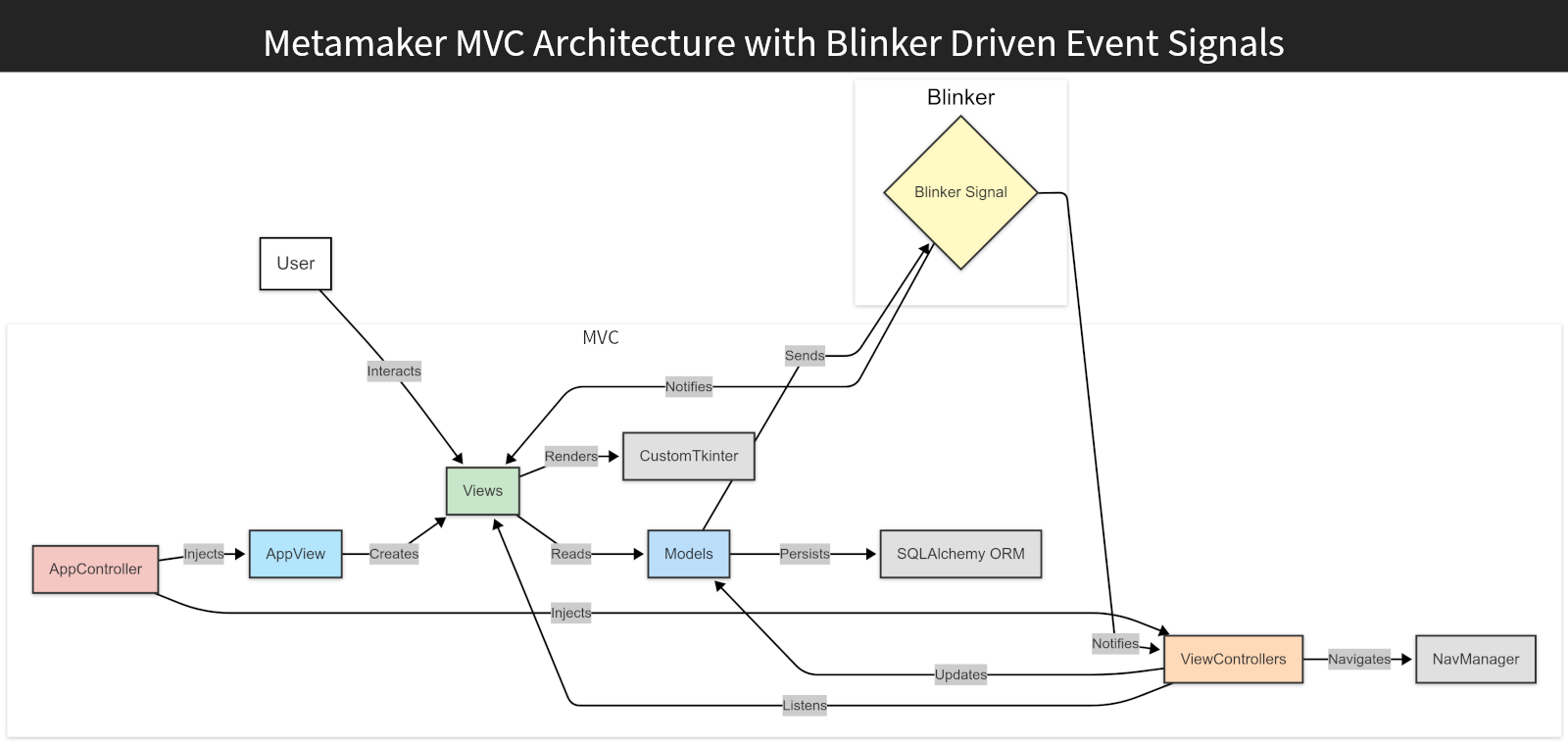
<div class="gallery full-width" data-columns="2"><img src="/images/projects/metamaker/metamaker-architecture-mvcAndBlinker.png" alt="Inside MetaMaker – A Walkthrough of Architectural Decisions" loading="lazy" decoding="async" /></div>

<p><em>MetaMaker MVC and Blinker architecture: <code class="language-plaintext highlighter-rouge">AppController</code> injects dependencies into <code class="language-plaintext highlighter-rouge">AppView</code> and the view controllers. Views like <code class="language-plaintext highlighter-rouge">SetViewMvc</code> render UI via <code class="language-plaintext highlighter-rouge">CustomTkinter</code>, while Blinker signals decouple updates.</em></p>

<hr />

<h2 id="building-an-event-driven-system-with-blinker">Building an Event-Driven System with Blinker</h2>

<p>To decouple components, I needed an event-driven system for UI updates – like refreshing after Darkblock transactions<sup id="fnref:8"><a href="#fn:8" class="footnote" rel="footnote" role="doc-noteref">7</a></sup>. Custom listeners (<code class="language-plaintext highlighter-rouge">RepoEvent</code>) caused complexity early on, so I switched to Blinker.</p>

<h3 id="triggering-signals">Triggering Signals</h3>

<p>Signals are fired from functions, such as associating an NFT with a Darkblock:</p>

<div class="language-python highlighter-rouge"><div class="highlight"><pre class="highlight"><code><table class="rouge-table"><tbody><tr><td class="rouge-gutter gl"><pre class="lineno">1
2
3
4
5
6
7
</pre></td><td class="rouge-code"><pre><span class="k">def</span> <span class="nf">associate_nft</span><span class="p">(</span><span class="n">self</span><span class="p">,</span> <span class="n">dblock_id</span><span class="p">:</span> <span class="nb">int</span><span class="p">,</span> <span class="n">nft_id</span><span class="p">:</span> <span class="nb">int</span><span class="p">):</span>
    <span class="sh">"""</span><span class="s">Associate an NFT with a Darkblock by updating nft_id in database.</span><span class="sh">"""</span>
    <span class="k">try</span><span class="p">:</span>
        <span class="n">db</span><span class="p">.</span><span class="nf">update_item</span><span class="p">(</span><span class="n">orm_obj</span><span class="o">=</span><span class="n">Darkblock</span><span class="p">,</span> <span class="n">item_id</span><span class="o">=</span><span class="n">dblock_id</span><span class="p">,</span> <span class="n">update_data</span><span class="o">=</span><span class="p">{</span><span class="sh">"</span><span class="s">nft_id</span><span class="sh">"</span><span class="p">:</span> <span class="n">nft_id</span><span class="p">})</span>
        <span class="n">self</span><span class="p">.</span><span class="n">_on_updated_signal</span><span class="p">.</span><span class="nf">send</span><span class="p">(</span><span class="n">self</span><span class="p">,</span> <span class="n">dblock_id</span><span class="o">=</span><span class="n">dblock_id</span><span class="p">)</span>
    <span class="k">except</span> <span class="nb">Exception</span> <span class="k">as</span> <span class="n">error</span><span class="p">:</span>
        <span class="n">self</span><span class="p">.</span><span class="nf">_handle_update_error</span><span class="p">(</span><span class="n">error</span><span class="p">,</span> <span class="n">dblock_id</span><span class="o">=</span><span class="n">dblock_id</span><span class="p">)</span>
</pre></td></tr></tbody></table></code></pre></div></div>

<h3 id="handling-signals">Handling Signals</h3>

<p>Views or controllers register handlers:</p>

<div class="language-python highlighter-rouge"><div class="highlight"><pre class="highlight"><code><table class="rouge-table"><tbody><tr><td class="rouge-gutter gl"><pre class="lineno">1
2
3
4
5
6
7
8
</pre></td><td class="rouge-code"><pre><span class="nd">@override</span>
<span class="k">def</span> <span class="nf">signal_handlers</span><span class="p">(</span><span class="n">self</span><span class="p">)</span> <span class="o">-&gt;</span> <span class="n">Optional</span><span class="p">[</span><span class="nb">dict</span><span class="p">]:</span>
    <span class="sh">"""</span><span class="s">Register signal handlers for view/controller updates.</span><span class="sh">"""</span>
    <span class="k">return</span> <span class="p">{</span>
        <span class="sh">'</span><span class="s">dblock_manager_on_updated</span><span class="sh">'</span><span class="p">:</span> <span class="n">self</span><span class="p">.</span><span class="n">_on_dblock_updated_signal</span><span class="p">,</span>
        <span class="sh">'</span><span class="s">nft_manager_on_updated</span><span class="sh">'</span><span class="p">:</span> <span class="n">self</span><span class="p">.</span><span class="n">_on_nft_updated_signal</span><span class="p">,</span>
        <span class="sh">'</span><span class="s">on_nav_intention_created</span><span class="sh">'</span><span class="p">:</span> <span class="n">self</span><span class="p">.</span><span class="n">_on_nav_intention_signal_received</span><span class="p">,</span>
    <span class="p">}</span>
</pre></td></tr></tbody></table></code></pre></div></div>

<h3 id="abstracting-signal-management">Abstracting Signal Management</h3>

<p>The <code class="language-plaintext highlighter-rouge">SignalHandlerMixin</code> abstracts signal registration so views and controllers manage Blinker signals consistently:</p>

<div class="language-python highlighter-rouge"><div class="highlight"><pre class="highlight"><code><table class="rouge-table"><tbody><tr><td class="rouge-gutter gl"><pre class="lineno">1
2
3
4
5
6
7
8
9
10
11
12
13
14
15
16
17
18
19
</pre></td><td class="rouge-code"><pre><span class="k">class</span> <span class="nc">SignalHandlerMixin</span><span class="p">:</span>
    <span class="k">def</span> <span class="nf">register_signal_handlers</span><span class="p">(</span><span class="n">self</span><span class="p">):</span>
        <span class="sh">"""</span><span class="s">Register Blinker signal handlers defined in signal_handlers().</span><span class="sh">"""</span>
        <span class="k">if</span> <span class="n">self</span><span class="p">.</span><span class="nf">signal_handlers</span><span class="p">():</span>
            <span class="k">for</span> <span class="n">signal_name</span><span class="p">,</span> <span class="n">handler</span> <span class="ow">in</span> <span class="n">self</span><span class="p">.</span><span class="nf">signal_handlers</span><span class="p">().</span><span class="nf">items</span><span class="p">():</span>
                <span class="n">new_signal</span> <span class="o">=</span> <span class="nf">signal</span><span class="p">(</span><span class="n">signal_name</span><span class="p">)</span>
                <span class="n">handler_partial</span> <span class="o">=</span> <span class="n">functools</span><span class="p">.</span><span class="nf">partial</span><span class="p">(</span><span class="n">handler</span><span class="p">)</span>
                <span class="n">self</span><span class="p">.</span><span class="n">_registered_signals</span><span class="p">[</span><span class="n">new_signal</span><span class="p">]</span> <span class="o">=</span> <span class="n">handler_partial</span>
                <span class="n">new_signal</span><span class="p">.</span><span class="nf">connect</span><span class="p">(</span><span class="n">handler_partial</span><span class="p">)</span>

    <span class="k">def</span> <span class="nf">signal_handlers</span><span class="p">(</span><span class="n">self</span><span class="p">)</span> <span class="o">-&gt;</span> <span class="n">Optional</span><span class="p">[</span><span class="nb">dict</span><span class="p">]:</span>
        <span class="sh">"""</span><span class="s">Return a dict of signals and their handler functions, e.g. {</span><span class="sh">'</span><span class="s">signal</span><span class="sh">'</span><span class="s">: self.on_signal}.</span><span class="sh">"""</span>
        <span class="k">return</span> <span class="bp">None</span>

    <span class="k">def</span> <span class="nf">unregister_signal_handlers</span><span class="p">(</span><span class="n">self</span><span class="p">):</span>
        <span class="sh">"""</span><span class="s">Unregister all signal handlers.</span><span class="sh">"""</span>
        <span class="k">for</span> <span class="n">signal</span><span class="p">,</span> <span class="n">handler</span> <span class="ow">in</span> <span class="n">self</span><span class="p">.</span><span class="n">_registered_signals</span><span class="p">.</span><span class="nf">items</span><span class="p">():</span>
            <span class="n">signal</span><span class="p">.</span><span class="nf">disconnect</span><span class="p">(</span><span class="n">handler</span><span class="p">)</span>
        <span class="n">self</span><span class="p">.</span><span class="n">_registered_signals</span> <span class="o">=</span> <span class="p">{}</span>
</pre></td></tr></tbody></table></code></pre></div></div>

<p><strong>The payoff:</strong> adding a new signal handler is now a one-line entry in <code class="language-plaintext highlighter-rouge">signal_handlers()</code> – no manual <code class="language-plaintext highlighter-rouge">.connect()</code>/<code class="language-plaintext highlighter-rouge">.disconnect()</code> bookkeeping anywhere else in the class. See the full implementation in <a href="https://github.com/michael-lundie/metamaker">MetaMaker’s repo</a>.</p>

<div class="history-callout">

  <p><strong>Takeaway:</strong></p>

  <p>Blinker, paired with the <code class="language-plaintext highlighter-rouge">SignalHandlerMixin</code>, meant a new subscriber never has to touch the emitter’s code, and teardown is a single <code class="language-plaintext highlighter-rouge">unregister_signal_handlers()</code> call instead of hunting down every <code class="language-plaintext highlighter-rouge">.connect()</code>.</p>

</div>

<hr />

<h2 id="manual-dependency-injection-for-flexibility">Manual Dependency Injection for Flexibility</h2>

<p>To keep MetaMaker extensible, I used manual dependency injection rather than a DI library, keeping control over how components were wired.</p>

<h3 id="example-initialising-a-view">Example: Initialising a View</h3>

<p>The <code class="language-plaintext highlighter-rouge">AppController</code> injects dependencies for the create-set view:</p>

<div class="language-python highlighter-rouge"><div class="highlight"><pre class="highlight"><code><table class="rouge-table"><tbody><tr><td class="rouge-gutter gl"><pre class="lineno">1
2
3
4
5
6
7
8
9
10
11
12
13
14
15
</pre></td><td class="rouge-code"><pre><span class="nd">@override</span>
<span class="k">def</span> <span class="nf">nm_init_create_set_view</span><span class="p">(</span><span class="n">self</span><span class="p">):</span>
    <span class="sh">"""</span><span class="s">Initialize and set up the create set view, pausing the active view.</span><span class="sh">"""</span>
    <span class="n">self</span><span class="p">.</span><span class="nf">_pause_active_view</span><span class="p">()</span>
    <span class="n">create_set_controller</span> <span class="o">=</span> <span class="nc">CreateSetControllerMvc</span><span class="p">(</span>
        <span class="n">set_manager</span><span class="o">=</span><span class="n">self</span><span class="p">.</span><span class="n">_set_manager</span><span class="p">,</span>
        <span class="n">nft_manager</span><span class="o">=</span><span class="n">self</span><span class="p">.</span><span class="n">_nft_manager</span><span class="p">,</span>
        <span class="n">nav_manager</span><span class="o">=</span><span class="n">self</span><span class="p">,</span>
    <span class="p">)</span>
    <span class="n">CreateSetControllerMvc</span><span class="p">.</span><span class="n">class_id</span> <span class="o">+=</span> <span class="mi">1</span>
    <span class="n">create_set_view</span> <span class="o">=</span> <span class="n">self</span><span class="p">.</span><span class="n">_app_view</span><span class="p">.</span><span class="nf">init_create_set_view</span><span class="p">(</span>
        <span class="n">col_accessor</span><span class="o">=</span><span class="n">self</span><span class="p">.</span><span class="n">_collection_manager</span><span class="p">,</span>
        <span class="n">set_accessor</span><span class="o">=</span><span class="n">self</span><span class="p">.</span><span class="n">_set_manager</span><span class="p">,</span>
    <span class="p">)</span>
    <span class="n">self</span><span class="p">.</span><span class="nf">_start_as_active_mvc</span><span class="p">(</span><span class="n">create_set_controller</span><span class="p">,</span> <span class="n">create_set_view</span><span class="p">)</span>
</pre></td></tr></tbody></table></code></pre></div></div>

<p><strong>Why manual DI?</strong> It offers explicit control, which avoids premature abstraction and simplifies debugging, at the cost of some boilerplate.</p>

<div class="history-callout">

  <p><strong>Takeaway:</strong></p>

  <p>Manual DI gave me flexibility and a clear view of MetaMaker’s wiring, with a known upgrade path to a DI library once the boundaries stabilised.</p>

</div>

<hr />

<h2 id="supporting-persistence-with-sqlalchemy">Supporting Persistence with SQLAlchemy</h2>

<p>SQLAlchemy’s ORM balanced abstraction against simplicity for database access. Here is an example from <code class="language-plaintext highlighter-rouge">CollectionManager</code>:</p>

<div class="language-python highlighter-rouge"><div class="highlight"><pre class="highlight"><code><table class="rouge-table"><tbody><tr><td class="rouge-gutter gl"><pre class="lineno">1
2
3
4
5
6
7
8
9
10
11
12
13
14
</pre></td><td class="rouge-code"><pre><span class="k">class</span> <span class="nc">CollectionManager</span><span class="p">:</span>
    <span class="k">def</span> <span class="nf">__init__</span><span class="p">(</span><span class="n">self</span><span class="p">):</span>
        <span class="n">self</span><span class="p">.</span><span class="n">_collection_id</span> <span class="o">=</span> <span class="bp">None</span>
        <span class="n">self</span><span class="p">.</span><span class="n">_collection</span> <span class="o">=</span> <span class="nc">NftMetadataCollection</span><span class="p">()</span>
        <span class="n">self</span><span class="p">.</span><span class="n">_on_updated_signal</span> <span class="o">=</span> <span class="nf">signal</span><span class="p">(</span><span class="sh">"</span><span class="s">collection_manager_on_updated</span><span class="sh">"</span><span class="p">)</span>

    <span class="k">def</span> <span class="nf">get_collection_traits</span><span class="p">(</span><span class="n">self</span><span class="p">):</span>
        <span class="n">query</span> <span class="o">=</span> <span class="p">(</span>
            <span class="nf">select</span><span class="p">(</span><span class="n">Trait</span><span class="p">)</span>
            <span class="p">.</span><span class="nf">select_from</span><span class="p">(</span><span class="n">NftMetadataCollection</span><span class="p">)</span>
            <span class="p">.</span><span class="nf">join</span><span class="p">(</span><span class="n">NftMetadataCollection</span><span class="p">.</span><span class="n">traits</span><span class="p">)</span>
            <span class="p">.</span><span class="nf">where</span><span class="p">(</span><span class="n">NftMetadataCollection</span><span class="p">.</span><span class="nb">id</span> <span class="o">==</span> <span class="n">self</span><span class="p">.</span><span class="n">_collection_id</span><span class="p">)</span>
        <span class="p">)</span>
        <span class="k">return</span> <span class="n">db</span><span class="p">.</span><span class="nf">read_database</span><span class="p">(</span><span class="n">query</span><span class="p">)</span>
</pre></td></tr></tbody></table></code></pre></div></div>

<p><strong>Challenge:</strong> an out-of-date course initially had me writing legacy SQLAlchemy queries. Making the switch to 2.0 streamlined persistence. The lesson: always check the official documentation and web site.</p>

<div class="history-callout">

  <p><strong>Takeaway:</strong></p>

  <p>SQLAlchemy’s ORM meant most database access was a few lines of Python instead of hand-written SQL. From there the repositories could mediate every write without extra boilerplate.</p>

</div>

<hr />

<h2 id="lessons-learned-and-reflections">Lessons Learned and Reflections</h2>

<p>MetaMaker refined my architectural planning, building on my Java-Android experience as I learned Python’s ecosystem. Modular design streamlined component development and refactoring. While debugging was a real challenge, tackling it systematically made all the difference. For all the self-doubt along the way, MetaMaker stands as a record of how my architectural thinking evolved – a project I am still glad to share.</p>

<hr />

<h2 id="metamaker--next-steps">MetaMaker – Next Steps</h2>

<p>For the full picture on this project, read the <a href="/project/metamaker">MetaMaker case study</a>, or browse the <a href="https://github.com/michael-lundie/metamaker">code on GitHub</a>.</p>

<p>Or, since you have read this far – a choice:</p>

<p><a class="related-project" href="/project/inpromptout" style="--rp-image: url('/images/projects/inpromptout/inpromptout-feature.webp'); --rp-accent: #DE4949;">
<span class="related-project__media" aria-hidden="true"></span>
<span class="related-project__content"><span class="related-project__eyebrow">Case study</span>
<span class="related-project__title">InPromptOut</span>
<span class="related-project__desc">My latest and most rigorous case study: graph modelling, a performance crisis, a security audit and cost-safety work. See how deep the architecture goes.</span>
<span class="related-project__cue">Explore</span>
</span>
</a></p>

<div class="choice-or"><span>or</span></div>

<p><a class="related-project" href="/project/phonixlab" style="--rp-image: url('/images/projects/phonixlab/phonixlab-hero.webp'); --rp-accent: #7C5BD9;">
<span class="related-project__media" aria-hidden="true"></span>
<span class="related-project__content"><span class="related-project__eyebrow">Case study</span>
<span class="related-project__title">PhonixLab</span>
<span class="related-project__desc">A live classroom phonics platform, in daily use across an eleven-school education board. Step into a project running in the real world.</span>
<span class="related-project__cue">Take a look</span>
</span>
</a></p>

<hr />

<h2 id="lets-connect">Let’s Connect</h2>

<p>If you are interested in event-driven Python architecture, MVC desktop apps, or drawing clean boundaries in small codebases, I’d be glad to hear from you.</p>

<div class="inline-connect">
<button type="button" class="connect-link connect-link--email inline-connect__trigger js-contact-inline" aria-expanded="false" aria-controls="inline-connect-mount">
<span class="connect-link__icon"><svg xmlns="http://www.w3.org/2000/svg" viewBox="0 0 24 24" fill="none" stroke="currentColor" stroke-width="1.6" stroke-linecap="round" stroke-linejoin="round" aria-hidden="true" focusable="false"><rect x="2" y="4" width="20" height="16" rx="2" /><path d="m2 7 10 6 10-6" /></svg>
</span>
<span class="connect-link__body">
<span class="connect-link__label">Send a message</span>
<span class="connect-link__text">Reach out and I'll get back to you</span>
</span>
</button>
<p class="inline-connect__fallback">Prefer to email me directly? <a href="mailto:hello@lundie.io">hello@lundie.io</a></p>
<div class="inline-connect__mount" id="inline-connect-mount"></div>

<template id="inline-contact-template">
<div class="contact__wrap contact__wrap--inline">
<form method="POST" action="https://formspree.io/f/mqeoenjz" class="contact__form">
<div class="input-group">
<label for="name-inline">Your Name</label>
<input type="text" name="name" id="name-inline" placeholder="What should I call you?" required="" />
</div>
<div class="input-group">
<label for="email-inline">Your Email</label>
<input type="email" name="email" id="email-inline" placeholder="What's your email address?" required="" />
</div>
<div class="input-group">
<label for="message-inline">Your Message</label>
<textarea name="message" id="message-inline" placeholder="What's on your mind?" rows="4" required=""></textarea>
</div>
<input type="hidden" name="_next" value="https://lundie.io/thanks" />
<input type="hidden" name="_subject" value="Contact form submission" />
<input type="text" name="_gotcha" style="display: none;" class="contact-form__gotcha" value="" tabindex="-1" autocomplete="off" />
<div class="input-submit">
<input type="submit" class="button--fill" value="Send Message" />
</div>
</form>
<p class="contact__feedback contact__feedback--success" role="status" hidden="">
Thanks – your message is on its way. I'll get back to you soon.
</p>
<p class="contact__feedback contact__feedback--error" role="alert" hidden="">
Something went wrong sending that. Please try again, or email me directly at
<a href="mailto:hello@lundie.io">hello@lundie.io</a>.
</p>
</div>
</template>
</div>

<hr />

<div class="footnotes" role="doc-endnotes">
  <ol>
    <li id="fn:1">
      <p><a href="https://www.darkblock.io/">Darkblock</a> is a service for attaching encrypted, unlockable content to digital assets. <a href="#fnref:1" class="reversefootnote" role="doc-backlink">&#8617;</a></p>
    </li>
    <li id="fn:5">
      <p><a href="https://en.wikipedia.org/wiki/Event-driven_programming">Event-Driven Programming</a> is a design pattern where components react to events; Blinker is a Python library that enables this through signals. <a href="#fnref:5" class="reversefootnote" role="doc-backlink">&#8617;</a></p>
    </li>
    <li id="fn:6">
      <p><a href="https://en.wikipedia.org/wiki/Dependency_injection">Dependency Injection</a> is a design pattern where dependencies are passed into objects, improving modularity and testability. <a href="#fnref:6" class="reversefootnote" role="doc-backlink">&#8617;</a></p>
    </li>
    <li id="fn:4">
      <p>MVC (Model-View-Controller) is a design pattern that separates an application into Models (data), Views (UI) and Controllers (logic) for better organisation. <a href="#fnref:4" class="reversefootnote" role="doc-backlink">&#8617;</a></p>
    </li>
    <li id="fn:2">
      <p><a href="https://customtkinter.tomschimansky.com/">CustomTkinter</a> is a modern, customisable Python UI library based on the <a href="https://en.wikipedia.org/wiki/Tkinter">Tkinter</a> GUI library. <a href="#fnref:2" class="reversefootnote" role="doc-backlink">&#8617;</a> <a href="#fnref:2:1" class="reversefootnote" role="doc-backlink">&#8617;<sup>2</sup></a></p>
    </li>
    <li id="fn:3">
      <p><a href="https://en.wikipedia.org/wiki/SQLAlchemy">SQLAlchemy</a> is a Python library for working with databases; its ORM (Object-Relational Mapping) maps database tables to Python objects for easier data management. <a href="#fnref:3" class="reversefootnote" role="doc-backlink">&#8617;</a></p>
    </li>
    <li id="fn:8">
      <p>Darkblocks are units of encrypted, unlockable content attached to a digital asset, created via the Darkblock API (see footnote 1). <a href="#fnref:8" class="reversefootnote" role="doc-backlink">&#8617;</a></p>
    </li>
  </ol>
</div>]]></content><author><name>Michael Lundie</name><email>hello@lundie.io</email></author><category term="python" /><category term="tkinter" /><category term="mvc" /><category term="sqlalchemy" /><category term="blinker" /><category term="event-driven-programming" /><category term="dependency-injection" /><category term="desktop-development" /><summary type="html"><![CDATA[A walkthrough of MetaMaker's architecture – why I chose MVC for separation of concerns, how I used Blinker for event-driven updates, and the rationale behind manual dependency injection. Key decisions, challenges and trade-offs.]]></summary><media:thumbnail xmlns:media="http://search.yahoo.com/mrss/" url="https://lundie.io/images/social/metamaker-architectural-decisions.png" /><media:content medium="image" url="https://lundie.io/images/social/metamaker-architectural-decisions.png" xmlns:media="http://search.yahoo.com/mrss/" /></entry><entry><title type="html">Threading Deep Dive – Keeping MetaMaker Responsive with a Custom Thread Pool</title><link href="https://lundie.io/blog/metamaker-threading-deep-dive" rel="alternate" type="text/html" title="Threading Deep Dive – Keeping MetaMaker Responsive with a Custom Thread Pool" /><published>2025-03-09T00:00:00+00:00</published><updated>2025-03-09T00:00:00+00:00</updated><id>https://lundie.io/blog/metamaker-threading-deep-dive</id><content type="html" xml:base="https://lundie.io/blog/metamaker-threading-deep-dive"><![CDATA[<h2 id="introduction">Introduction</h2>

<p>When building MetaMaker – a cross-platform desktop app for managing file metadata and Darkblock upload workflows – I prioritised a responsive UI, even during demanding tasks like image processing and batch API uploads.</p>

<p>Coming from a Java-Android background, this was also a chance to get hands-on with Python’s threading model<sup id="fnref:7"><a href="#fn:7" class="footnote" rel="footnote" role="doc-noteref">1</a></sup>. I learn best by building, and with <code class="language-plaintext highlighter-rouge">Tkinter</code><sup id="fnref:2"><a href="#fn:2" class="footnote" rel="footnote" role="doc-noteref">2</a></sup> powering the GUI, it offered both a real challenge and a way to tackle performance problems head-on.</p>

<p>Here is how I built a custom thread pool wrapper to keep MetaMaker’s interface fluid and responsive.</p>

<h2 id="the-challenge">The Challenge</h2>

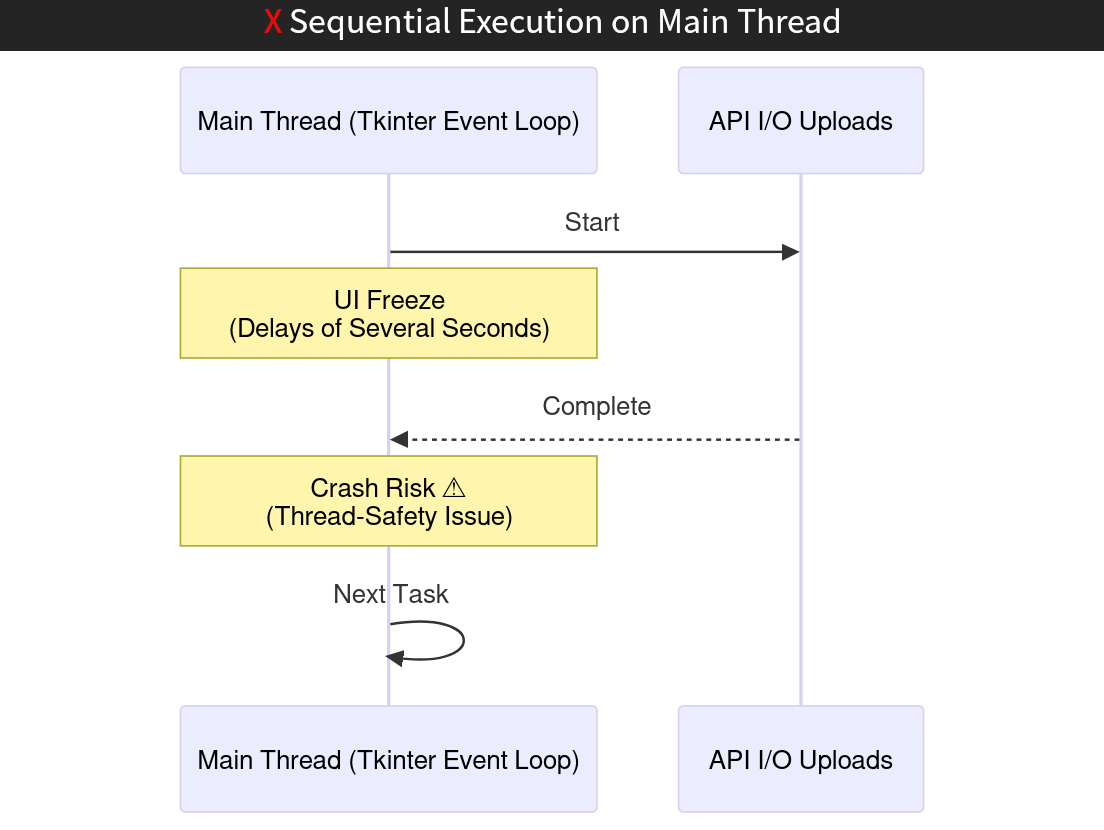
<p><code class="language-plaintext highlighter-rouge">Tkinter</code>, the backbone of MetaMaker’s <code class="language-plaintext highlighter-rouge">CustomTkinter</code> interface, runs on the main thread. Long-running tasks – image processing such as resizing, and API uploads – blocked the UI, causing delays of several seconds. Worse, <code class="language-plaintext highlighter-rouge">Tkinter</code>’s lack of thread safety meant worker thread updates could crash the app. This was a barrier to scaling MetaMaker for batch workflows and large asset uploads.</p>

<div class="history-callout">

  <p><strong>Takeaway:</strong></p>

  <p>To create a smooth user experience it was clear MetaMaker required threading from day one. The implementation needed to be thread-safe, lightweight and specifically tailored for <code class="language-plaintext highlighter-rouge">Tkinter</code>.</p>

</div>

<div class="gallery full-width" data-columns="2"><img src="/images/projects/metamaker/metamaker-threading-sequentialUploads-diagram.png" alt="Threading Deep Dive – Keeping MetaMaker Responsive with a Custom Thread Pool" loading="lazy" decoding="async" /><img src="/images/projects/metamaker/metamaker-threading-multithreadUploads-diagram.png" alt="Threading Deep Dive – Keeping MetaMaker Responsive with a Custom Thread Pool" loading="lazy" decoding="async" /></div>

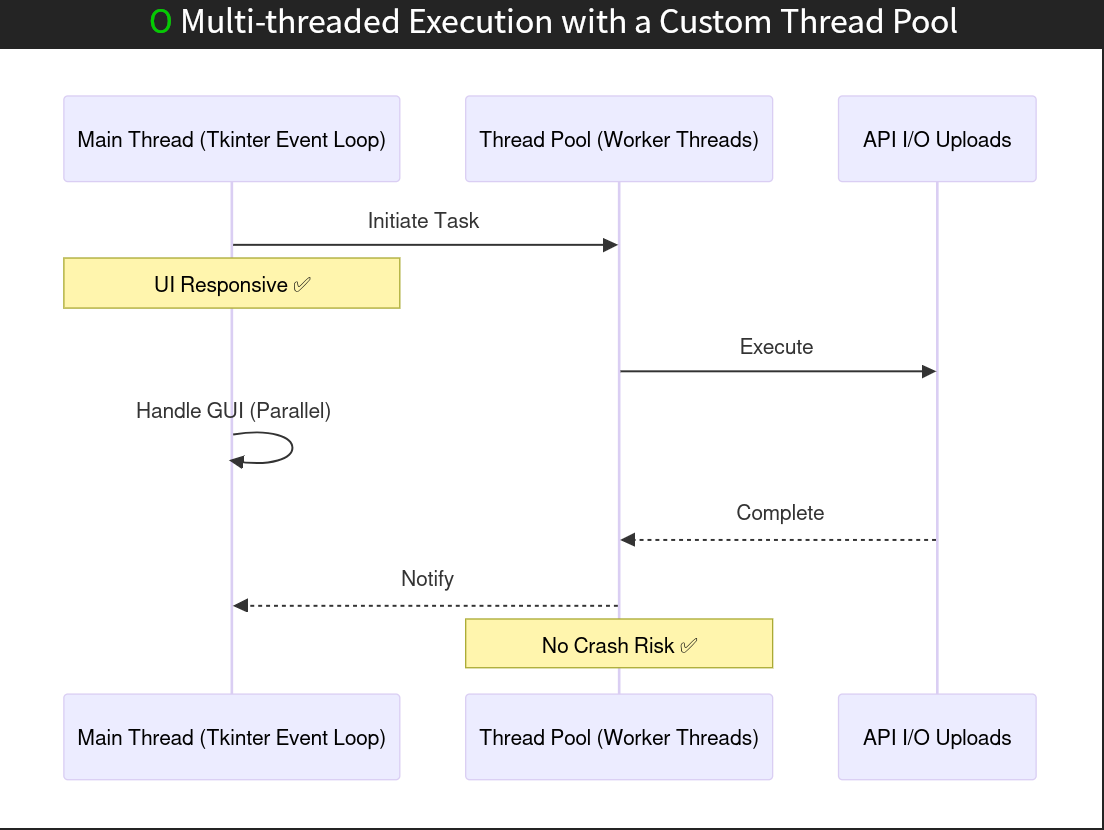
<p><em>Sequence diagram: sequential execution (left) blocks the main thread during tasks like API uploads, while multi-threaded execution (right) offloads tasks to worker threads.</em></p>

<h2 id="the-solution-a-custom-thread-pool">The Solution: A Custom Thread Pool</h2>

<p>I reached for the familiar tools first. Python’s <code class="language-plaintext highlighter-rouge">asyncio</code><sup id="fnref:10"><a href="#fn:10" class="footnote" rel="footnote" role="doc-noteref">3</a></sup> conflicted with <code class="language-plaintext highlighter-rouge">Tkinter</code>’s <code class="language-plaintext highlighter-rouge">mainloop</code><sup id="fnref:11"><a href="#fn:11" class="footnote" rel="footnote" role="doc-noteref">4</a></sup> and could not help with CPU-bound tasks like image resizing. <code class="language-plaintext highlighter-rouge">multiprocessing</code><sup id="fnref:12"><a href="#fn:12" class="footnote" rel="footnote" role="doc-noteref">5</a></sup> enabled true parallelism, but its overhead – separate memory spaces and inter-process communication – was unnecessary for MetaMaker’s needs. <code class="language-plaintext highlighter-rouge">ThreadPoolExecutor</code><sup id="fnref:13"><a href="#fn:13" class="footnote" rel="footnote" role="doc-noteref">6</a></sup> offered basic threading but lacked fine-grained control over task scheduling and callbacks.</p>

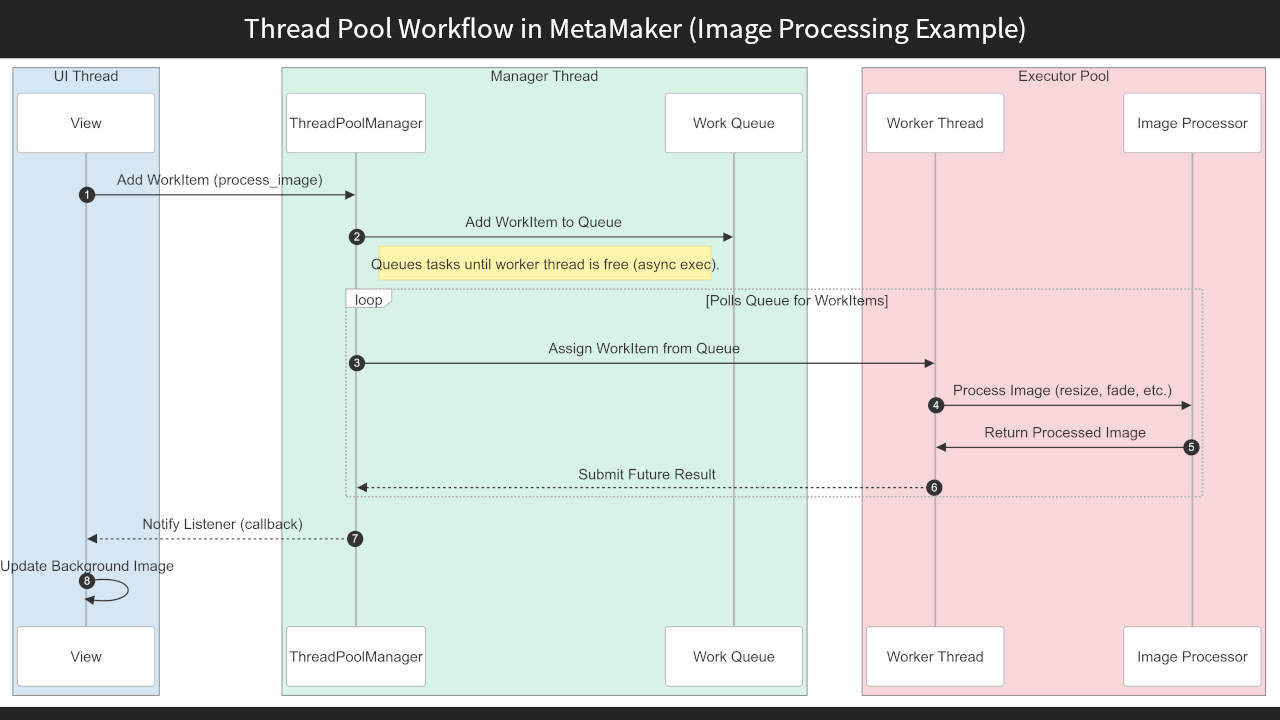
<p>To get the behaviour I needed, I built a <code class="language-plaintext highlighter-rouge">ThreadPoolManager</code><sup id="fnref:9"><a href="#fn:9" class="footnote" rel="footnote" role="doc-noteref">7</a></sup>: a custom wrapper around <code class="language-plaintext highlighter-rouge">ThreadPoolExecutor</code>, paired with a thread-safe work queue<sup id="fnref:14"><a href="#fn:14" class="footnote" rel="footnote" role="doc-noteref">8</a></sup> and a listener system for result handling and UI updates. This gave me:</p>

<ul>
  <li>Precise control over task scheduling and concurrency limits</li>
  <li>Safe UI updates through listener-based callbacks and event signals (using Blinker<sup id="fnref:5"><a href="#fn:5" class="footnote" rel="footnote" role="doc-noteref">9</a></sup>)</li>
  <li>Room for future enhancements, such as task prioritisation or retries</li>
</ul>

<div class="gallery full-width" data-columns="1"><img src="/images/projects/metamaker/metamaker-threaded-image-proc-flow.png" alt="Threading Deep Dive – Keeping MetaMaker Responsive with a Custom Thread Pool" loading="lazy" decoding="async" /></div>

<p><em>Sequence diagram: how a typical background task – such as image processing – moves through this architecture, from the view layer to the worker thread and back to the UI.</em></p>

<div class="language-python highlighter-rouge"><div class="highlight"><pre class="highlight"><code><table class="rouge-table"><tbody><tr><td class="rouge-gutter gl"><pre class="lineno">1
2
3
4
5
6
7
8
9
10
11
12
13
14
15
16
17
18
19
20
21
22
23
24
25
26
27
</pre></td><td class="rouge-code"><pre><span class="k">class</span> <span class="nc">ThreadPoolManager</span><span class="p">:</span>
    <span class="k">def</span> <span class="nf">__init__</span><span class="p">(</span><span class="n">self</span><span class="p">,</span> <span class="n">max_threads</span><span class="o">=</span><span class="mi">3</span><span class="p">):</span>
        <span class="n">self</span><span class="p">.</span><span class="n">_is_running</span> <span class="o">=</span> <span class="bp">True</span>
        <span class="n">self</span><span class="p">.</span><span class="n">max_threads</span> <span class="o">=</span> <span class="n">max_threads</span>
        <span class="n">self</span><span class="p">.</span><span class="n">work_queue</span> <span class="o">=</span> <span class="nc">Queue</span><span class="p">()</span>                <span class="c1"># stdlib queue.Queue
</span>        <span class="n">self</span><span class="p">.</span><span class="n">queue_lock</span> <span class="o">=</span> <span class="n">threading</span><span class="p">.</span><span class="nc">Lock</span><span class="p">()</span>       <span class="c1"># guards queue access
</span>        <span class="n">self</span><span class="p">.</span><span class="n">_pool</span><span class="p">:</span> <span class="n">ThreadPoolExecutor</span> <span class="o">=</span> <span class="bp">None</span>
        <span class="n">self</span><span class="p">.</span><span class="n">_listeners</span> <span class="o">=</span> <span class="p">[]</span>
        <span class="c1"># A dedicated manager thread owns the executor and drains the queue
</span>        <span class="n">self</span><span class="p">.</span><span class="n">threaded_manager</span> <span class="o">=</span> <span class="n">threading</span><span class="p">.</span><span class="nc">Thread</span><span class="p">(</span><span class="n">target</span><span class="o">=</span><span class="n">self</span><span class="p">.</span><span class="n">manager</span><span class="p">,</span> <span class="n">args</span><span class="o">=</span><span class="p">(</span><span class="n">self</span><span class="p">.</span><span class="n">callback</span><span class="p">,))</span>
        <span class="n">self</span><span class="p">.</span><span class="n">threaded_manager</span><span class="p">.</span><span class="nf">start</span><span class="p">()</span>

    <span class="k">def</span> <span class="nf">manager</span><span class="p">(</span><span class="n">self</span><span class="p">,</span> <span class="n">callback</span><span class="p">):</span>
        <span class="k">with</span> <span class="nc">ThreadPoolExecutor</span><span class="p">(</span><span class="n">max_workers</span><span class="o">=</span><span class="n">self</span><span class="p">.</span><span class="n">max_threads</span><span class="p">)</span> <span class="k">as</span> <span class="n">self</span><span class="p">.</span><span class="n">_pool</span><span class="p">:</span>
            <span class="k">while</span> <span class="n">self</span><span class="p">.</span><span class="n">_is_running</span><span class="p">:</span>
                <span class="k">try</span><span class="p">:</span>
                    <span class="k">with</span> <span class="n">self</span><span class="p">.</span><span class="n">queue_lock</span><span class="p">:</span>
                        <span class="n">task</span><span class="p">:</span> <span class="n">WorkItem</span> <span class="o">=</span> <span class="n">self</span><span class="p">.</span><span class="n">work_queue</span><span class="p">.</span><span class="nf">get_nowait</span><span class="p">()</span>
                    <span class="n">future</span> <span class="o">=</span> <span class="n">self</span><span class="p">.</span><span class="n">_pool</span><span class="p">.</span><span class="nf">submit</span><span class="p">(</span><span class="n">task</span><span class="p">.</span><span class="n">work</span><span class="p">)</span>
                    <span class="n">future</span><span class="p">.</span><span class="n">tag</span> <span class="o">=</span> <span class="n">task</span><span class="p">.</span><span class="n">tag</span>                <span class="c1"># tag rides along for routing
</span>                    <span class="n">future</span><span class="p">.</span><span class="nf">add_done_callback</span><span class="p">(</span><span class="n">callback</span><span class="p">)</span>
                <span class="k">except</span> <span class="n">queue</span><span class="p">.</span><span class="n">Empty</span><span class="p">:</span>
                    <span class="n">time</span><span class="p">.</span><span class="nf">sleep</span><span class="p">(</span><span class="mf">0.2</span><span class="p">)</span>                      <span class="c1"># poll; a Condition would be leaner
</span>
    <span class="k">def</span> <span class="nf">add_task</span><span class="p">(</span><span class="n">self</span><span class="p">,</span> <span class="n">work_item</span><span class="p">:</span> <span class="n">WorkItem</span><span class="p">):</span>
        <span class="k">with</span> <span class="n">self</span><span class="p">.</span><span class="n">queue_lock</span><span class="p">:</span>
            <span class="n">self</span><span class="p">.</span><span class="n">work_queue</span><span class="p">.</span><span class="nf">put</span><span class="p">(</span><span class="n">work_item</span><span class="p">)</span>
</pre></td></tr></tbody></table></code></pre></div></div>

<p><em>The <code class="language-plaintext highlighter-rouge">ThreadPoolManager</code> wraps <code class="language-plaintext highlighter-rouge">ThreadPoolExecutor</code>, adding a thread-safe queue and a listener system.</em></p>

<div class="history-callout">

  <p><strong>Takeaway:</strong></p>

  <p>Extending <code class="language-plaintext highlighter-rouge">ThreadPoolExecutor</code> with a custom wrapper provided the control MetaMaker’s threading challenges demanded.</p>

</div>

<p>This kept <code class="language-plaintext highlighter-rouge">Tkinter</code>’s main thread free for GUI updates while worker threads handled the heavy lifting, sidestepping <code class="language-plaintext highlighter-rouge">Tkinter</code>’s threading limitations with a lightweight, tailored solution.</p>

<h2 id="implementation-details">Implementation Details</h2>

<p>The <code class="language-plaintext highlighter-rouge">ThreadPoolManager</code> coordinates tasks through its custom wrapper around <code class="language-plaintext highlighter-rouge">ThreadPoolExecutor</code>. A thread-safe work queue (a <code class="language-plaintext highlighter-rouge">queue.Queue</code> guarded by a lock) stores incoming tasks, and a listener system manages result processing and UI updates.</p>

<p>Here is how it works for uploading Darkblocks<sup id="fnref:1"><a href="#fn:1" class="footnote" rel="footnote" role="doc-noteref">10</a></sup> (encrypted, unlockable content):</p>

<ul>
  <li>The <code class="language-plaintext highlighter-rouge">DblocksViewController</code><sup id="fnref:15"><a href="#fn:15" class="footnote" rel="footnote" role="doc-noteref">11</a></sup> triggers a <code class="language-plaintext highlighter-rouge">mint_darkblock</code><sup id="fnref:16"><a href="#fn:16" class="footnote" rel="footnote" role="doc-noteref">12</a></sup> task.</li>
  <li>The task is added to the work queue and executed asynchronously by a worker thread.</li>
  <li>The worker notifies a listener (<code class="language-plaintext highlighter-rouge">DblockServiceAsync</code><sup id="fnref:17"><a href="#fn:17" class="footnote" rel="footnote" role="doc-noteref">13</a></sup>), which forwards a <code class="language-plaintext highlighter-rouge">DblockServicePacket</code><sup id="fnref:18"><a href="#fn:18" class="footnote" rel="footnote" role="doc-noteref">14</a></sup> to the <code class="language-plaintext highlighter-rouge">DarkblockManager</code><sup id="fnref:19"><a href="#fn:19" class="footnote" rel="footnote" role="doc-noteref">15</a></sup>.</li>
  <li>The manager updates the database – e.g. storing a transaction ID – and emits a Blinker signal: <code class="language-plaintext highlighter-rouge">dblock_manager_on_updated</code>.</li>
  <li>The UI (<code class="language-plaintext highlighter-rouge">DblocksView</code><sup id="fnref:20"><a href="#fn:20" class="footnote" rel="footnote" role="doc-noteref">16</a></sup>) receives this signal through <code class="language-plaintext highlighter-rouge">DblockListViewMixin</code><sup id="fnref:21"><a href="#fn:21" class="footnote" rel="footnote" role="doc-noteref">17</a></sup> and updates the Darkblock list on the main thread, preserving <code class="language-plaintext highlighter-rouge">Tkinter</code> thread safety.</li>
</ul>

<p>View and controller components register as <code class="language-plaintext highlighter-rouge">ThreadPoolListeners</code><sup id="fnref:26"><a href="#fn:26" class="footnote" rel="footnote" role="doc-noteref">18</a></sup> to drive live progress bars and status updates, giving real-time feedback during tasks like uploads.</p>

<p>To prevent race conditions under high load – such as uploading 100 Darkblocks at once – a <code class="language-plaintext highlighter-rouge">threading.Lock</code><sup id="fnref:22"><a href="#fn:22" class="footnote" rel="footnote" role="doc-noteref">19</a></sup> guards the work queue. Without it, concurrent writes could drop tasks. A dedicated manager thread polls the work queue to dispatch tasks to the thread pool, though this polling could be optimised with a <code class="language-plaintext highlighter-rouge">threading.Condition</code><sup id="fnref:23"><a href="#fn:23" class="footnote" rel="footnote" role="doc-noteref">20</a></sup> to reduce CPU overhead.</p>

<div class="gallery full-width" data-columns="1"><img src="/images/projects/metamaker/metamaker-threading-task-lifecycle.png" alt="Threading Deep Dive – Keeping MetaMaker Responsive with a Custom Thread Pool" loading="lazy" decoding="async" /></div>

<p><em>Sequence diagram: a Darkblock task flows from the UI controller to the thread pool, then through worker threads, service listeners and the manager. Database updates trigger Blinker signals, which update the UI safely on the main thread – keeping MetaMaker responsive throughout the upload.</em></p>

<h2 id="why-not-just-use-a-library">Why Not Just Use a Library?</h2>

<p>I considered libraries like <code class="language-plaintext highlighter-rouge">celery</code><sup id="fnref:24"><a href="#fn:24" class="footnote" rel="footnote" role="doc-noteref">21</a></sup> and extending <code class="language-plaintext highlighter-rouge">concurrent.futures</code><sup id="fnref:25"><a href="#fn:25" class="footnote" rel="footnote" role="doc-noteref">22</a></sup>, but I wanted full control over thread lifecycle, queue strategy and UI-safe callbacks. Building my own manager kept things lightweight and easier to debug.</p>

<p>The other reason was educational. My previous multithreading experience came from Java-Android, so building this from scratch in Python was a practical way to deepen my understanding while solving real performance problems.</p>

<div class="history-callout">

  <p><strong>Takeaway:</strong></p>

  <p>Reaching for a library would have hidden the very control – and learning – I was after.</p>

</div>

<h2 id="lessons-learned">Lessons Learned</h2>

<p>Exploring <code class="language-plaintext highlighter-rouge">asyncio</code>, <code class="language-plaintext highlighter-rouge">ThreadPoolExecutor</code> and <code class="language-plaintext highlighter-rouge">multiprocessing</code> taught me how to navigate <code class="language-plaintext highlighter-rouge">Tkinter</code>’s threading limitations and the trade-offs of concurrency in GUI apps.</p>

<ul>
  <li><strong>Threading with <code class="language-plaintext highlighter-rouge">Tkinter</code> is tricky.</strong> You have to be meticulous about which thread touches the UI.</li>
  <li><strong>More control means less confusion.</strong> Owning the thread pool meant fewer surprises and more predictable behaviour.</li>
  <li><strong>Debugging multithreading is a different beast.</strong> Logging and visual debugging were invaluable when chasing rare issues.</li>
  <li><strong>Custom isn’t always overkill.</strong> Sometimes building exactly what you need is the right call.</li>
</ul>

<h2 id="real-world-impact">Real-World Impact</h2>

<p>With the thread pool in place, uploading a batch of 100 Darkblocks no longer blocked the interface: the window stayed interactive while worker threads did the work, where the same upload on the main thread would freeze MetaMaker for seconds at a time. Progress bars and status text, driven by <code class="language-plaintext highlighter-rouge">ThreadPoolListeners</code>, updated live throughout, so users saw the upload advancing instead of a frozen window.</p>

<div class="history-callout">

  <p><strong>Takeaway:</strong></p>

  <p>Effective threading directly shapes how an app feels to use.</p>

</div>

<h2 id="conclusion">Conclusion</h2>

<p>This custom thread pool keeps MetaMaker’s UI responsive – a cornerstone of the app despite <code class="language-plaintext highlighter-rouge">Tkinter</code>’s constraints.</p>

<h2 id="metamaker--next-steps">MetaMaker – Next Steps</h2>

<p>For the full picture on this project, read the <a href="/project/metamaker">MetaMaker case study</a>, or browse the <a href="https://github.com/michael-lundie/metamaker">code on GitHub</a>.</p>

<p>Or, since you have read this far – a choice:</p>

<p><a class="related-project" href="/project/inpromptout" style="--rp-image: url('/images/projects/inpromptout/inpromptout-feature.webp'); --rp-accent: #DE4949;">
<span class="related-project__media" aria-hidden="true"></span>
<span class="related-project__content"><span class="related-project__eyebrow">Case study</span>
<span class="related-project__title">InPromptOut</span>
<span class="related-project__desc">My latest and most rigorous case study: graph modelling, a performance crisis, a security audit and cost-safety work. See how deep the architecture goes.</span>
<span class="related-project__cue">Explore</span>
</span>
</a></p>

<div class="choice-or"><span>or</span></div>

<p><a class="related-project" href="/project/phonixlab" style="--rp-image: url('/images/projects/phonixlab/phonixlab-hero.webp'); --rp-accent: #7C5BD9;">
<span class="related-project__media" aria-hidden="true"></span>
<span class="related-project__content"><span class="related-project__eyebrow">Case study</span>
<span class="related-project__title">PhonixLab</span>
<span class="related-project__desc">A live classroom phonics platform, in daily use across an eleven-school education board. Step into a project running in the real world.</span>
<span class="related-project__cue">Take a look</span>
</span>
</a></p>

<hr />

<h2 id="lets-connect">Let’s Connect</h2>

<p>If you are interested in concurrency, responsive desktop UIs, or threading patterns in Python, I’d be glad to hear from you.</p>

<div class="inline-connect">
<button type="button" class="connect-link connect-link--email inline-connect__trigger js-contact-inline" aria-expanded="false" aria-controls="inline-connect-mount">
<span class="connect-link__icon"><svg xmlns="http://www.w3.org/2000/svg" viewBox="0 0 24 24" fill="none" stroke="currentColor" stroke-width="1.6" stroke-linecap="round" stroke-linejoin="round" aria-hidden="true" focusable="false"><rect x="2" y="4" width="20" height="16" rx="2" /><path d="m2 7 10 6 10-6" /></svg>
</span>
<span class="connect-link__body">
<span class="connect-link__label">Send a message</span>
<span class="connect-link__text">Reach out and I'll get back to you</span>
</span>
</button>
<p class="inline-connect__fallback">Prefer to email me directly? <a href="mailto:hello@lundie.io">hello@lundie.io</a></p>
<div class="inline-connect__mount" id="inline-connect-mount"></div>

<template id="inline-contact-template">
<div class="contact__wrap contact__wrap--inline">
<form method="POST" action="https://formspree.io/f/mqeoenjz" class="contact__form">
<div class="input-group">
<label for="name-inline">Your Name</label>
<input type="text" name="name" id="name-inline" placeholder="What should I call you?" required="" />
</div>
<div class="input-group">
<label for="email-inline">Your Email</label>
<input type="email" name="email" id="email-inline" placeholder="What's your email address?" required="" />
</div>
<div class="input-group">
<label for="message-inline">Your Message</label>
<textarea name="message" id="message-inline" placeholder="What's on your mind?" rows="4" required=""></textarea>
</div>
<input type="hidden" name="_next" value="https://lundie.io/thanks" />
<input type="hidden" name="_subject" value="Contact form submission" />
<input type="text" name="_gotcha" style="display: none;" class="contact-form__gotcha" value="" tabindex="-1" autocomplete="off" />
<div class="input-submit">
<input type="submit" class="button--fill" value="Send Message" />
</div>
</form>
<p class="contact__feedback contact__feedback--success" role="status" hidden="">
Thanks – your message is on its way. I'll get back to you soon.
</p>
<p class="contact__feedback contact__feedback--error" role="alert" hidden="">
Something went wrong sending that. Please try again, or email me directly at
<a href="mailto:hello@lundie.io">hello@lundie.io</a>.
</p>
</div>
</template>
</div>

<hr />

<div class="footnotes" role="doc-endnotes">
  <ol>
    <li id="fn:7">
      <p><a href="https://en.wikipedia.org/wiki/Thread_(computing)">Multithreading</a> allows multiple tasks to run concurrently, improving responsiveness in applications like MetaMaker. <a href="#fnref:7" class="reversefootnote" role="doc-backlink">&#8617;</a></p>
    </li>
    <li id="fn:2">
      <p><a href="https://customtkinter.tomschimansky.com/">CustomTkinter</a> is a modern, customisable Python UI library based on the <a href="https://en.wikipedia.org/wiki/Tkinter">Tkinter</a> GUI library. <a href="#fnref:2" class="reversefootnote" role="doc-backlink">&#8617;</a></p>
    </li>
    <li id="fn:10">
      <p><a href="https://docs.python.org/3/library/asyncio.html">asyncio</a> is a Python library for writing asynchronous code using an event loop, but it is not ideal for CPU-bound tasks or Tkinter’s main thread. <a href="#fnref:10" class="reversefootnote" role="doc-backlink">&#8617;</a></p>
    </li>
    <li id="fn:11">
      <p><a href="https://en.wikipedia.org/wiki/Event_loop">mainloop</a> is the event loop in Tkinter that processes GUI events, requiring all UI updates to occur on the main thread. <a href="#fnref:11" class="reversefootnote" role="doc-backlink">&#8617;</a></p>
    </li>
    <li id="fn:12">
      <p><a href="https://docs.python.org/3/library/multiprocessing.html">multiprocessing</a> is a Python module for true parallelism using separate processes, but its overhead makes it unsuitable for MetaMaker’s lightweight threading needs. <a href="#fnref:12" class="reversefootnote" role="doc-backlink">&#8617;</a></p>
    </li>
    <li id="fn:13">
      <p><a href="https://docs.python.org/3/library/concurrent.futures.html#threadpoolexecutor">ThreadPoolExecutor</a> is a Python class in the concurrent.futures module for managing a pool of threads, offering basic threading but lacking advanced control. <a href="#fnref:13" class="reversefootnote" role="doc-backlink">&#8617;</a></p>
    </li>
    <li id="fn:9">
      <p>ThreadPoolManager is a custom class I built to manage a pool of worker threads, keeping the UI responsive during background tasks. <a href="#fnref:9" class="reversefootnote" role="doc-backlink">&#8617;</a></p>
    </li>
    <li id="fn:14">
      <p>The work queue is a standard <code class="language-plaintext highlighter-rouge">queue.Queue</code>, guarded by a <code class="language-plaintext highlighter-rouge">threading.Lock</code> and drained by a dedicated manager thread that dispatches tasks to the thread pool. <a href="#fnref:14" class="reversefootnote" role="doc-backlink">&#8617;</a></p>
    </li>
    <li id="fn:5">
      <p><a href="https://en.wikipedia.org/wiki/Event-driven_programming">Event-Driven Programming</a> is a design pattern where components react to events; Blinker is a Python library that enables this through signals. <a href="#fnref:5" class="reversefootnote" role="doc-backlink">&#8617;</a></p>
    </li>
    <li id="fn:1">
      <p><a href="https://www.darkblock.io/">Darkblock</a> is a service for attaching encrypted, unlockable content to digital assets. <a href="#fnref:1" class="reversefootnote" role="doc-backlink">&#8617;</a></p>
    </li>
    <li id="fn:15">
      <p>DblocksViewController is a custom controller class that initiates Darkblock-related tasks, such as minting, in the MetaMaker UI. <a href="#fnref:15" class="reversefootnote" role="doc-backlink">&#8617;</a></p>
    </li>
    <li id="fn:16">
      <p>mint_darkblock is a custom task function that handles the creation of Darkblocks, executed asynchronously by worker threads. <a href="#fnref:16" class="reversefootnote" role="doc-backlink">&#8617;</a></p>
    </li>
    <li id="fn:17">
      <p>DblockServiceAsync is a custom listener class that processes asynchronous Darkblock task results and forwards them to the DarkblockManager. <a href="#fnref:17" class="reversefootnote" role="doc-backlink">&#8617;</a></p>
    </li>
    <li id="fn:18">
      <p>DblockServicePacket is a custom data structure used to encapsulate Darkblock task results for safe transmission between components. <a href="#fnref:18" class="reversefootnote" role="doc-backlink">&#8617;</a></p>
    </li>
    <li id="fn:19">
      <p>DarkblockManager is a custom manager class responsible for updating the database with Darkblock transaction data and emitting signals. <a href="#fnref:19" class="reversefootnote" role="doc-backlink">&#8617;</a></p>
    </li>
    <li id="fn:20">
      <p>DblocksView is a custom UI component that displays the list of Darkblocks and updates it based on signals from the DarkblockManager. <a href="#fnref:20" class="reversefootnote" role="doc-backlink">&#8617;</a></p>
    </li>
    <li id="fn:21">
      <p>DblockListViewMixin is a custom mixin class that enables DblocksView to handle Blinker signals and update the UI safely on the main thread. <a href="#fnref:21" class="reversefootnote" role="doc-backlink">&#8617;</a></p>
    </li>
    <li id="fn:26">
      <p>ThreadPoolListeners are custom callback interfaces that let MetaMaker components receive updates from worker threads, enabling real-time UI feedback. <a href="#fnref:26" class="reversefootnote" role="doc-backlink">&#8617;</a></p>
    </li>
    <li id="fn:22">
      <p><a href="https://docs.python.org/3/library/threading.html#lock-objects">threading.Lock</a> is a Python synchronisation primitive that prevents race conditions by allowing only one thread to access a resource at a time. <a href="#fnref:22" class="reversefootnote" role="doc-backlink">&#8617;</a></p>
    </li>
    <li id="fn:23">
      <p><a href="https://docs.python.org/3/library/threading.html#condition-objects">threading.Condition</a> is a Python synchronisation primitive that lets threads wait for or notify specific conditions, optimising queue polling. <a href="#fnref:23" class="reversefootnote" role="doc-backlink">&#8617;</a></p>
    </li>
    <li id="fn:24">
      <p><a href="https://docs.celeryproject.org/en/stable/">celery</a> is a distributed task queue library in Python, useful for complex workflows but overkill for MetaMaker’s threading needs. <a href="#fnref:24" class="reversefootnote" role="doc-backlink">&#8617;</a></p>
    </li>
    <li id="fn:25">
      <p><a href="https://docs.python.org/3/library/concurrent.futures.html">concurrent.futures</a> is a Python module providing high-level interfaces for asynchronous execution, including ThreadPoolExecutor, but lacking fine-grained customisation. <a href="#fnref:25" class="reversefootnote" role="doc-backlink">&#8617;</a></p>
    </li>
  </ol>
</div>]]></content><author><name>Michael Lundie</name><email>hello@lundie.io</email></author><summary type="html"><![CDATA[How I built a custom thread pool wrapper around ThreadPoolExecutor to keep MetaMaker's CustomTkinter UI responsive during image processing and batch uploads – with tag-based routing, listener callbacks and Blinker signals for safe UI updates.]]></summary><media:thumbnail xmlns:media="http://search.yahoo.com/mrss/" url="https://lundie.io/images/social/metamaker-threading-deep-dive.png" /><media:content medium="image" url="https://lundie.io/images/social/metamaker-threading-deep-dive.png" xmlns:media="http://search.yahoo.com/mrss/" /></entry></feed>