MetaMaker’s collection gallery, showcasing modular UI rendering with CustomTkinter.
Introduction
MetaMaker grew from a simple command-line tool for the Darkblock1 API into an open-source, cross-platform desktop app for managing file metadata and Darkblock upload workflows, running on Linux, Windows and Mac. Coming from a Java background, I had habits to unlearn – my early code was verbose, reflecting a Java mindset. Embracing Pythonic simplicity, MetaMaker became my proving ground for a modular, maintainable architecture.
This post covers the key decisions: MVC for separation of concerns, Blinker2 for event-driven updates, and manual dependency injection3 for flexibility – with code examples and the lessons behind them. For the broader picture, see the MetaMaker case study, or explore concurrency in the Threading Deep Dive.
Quick Navigation
- Choosing MVC for Separation of Concerns
- Building an Event-Driven System with Blinker
- Manual Dependency Injection for Flexibility
- Supporting Persistence with SQLAlchemy
- Lessons Learned and Reflections
- MetaMaker – Next Steps
Choosing MVC for Separation of Concerns
To keep MetaMaker maintainable, I needed a clear architectural pattern. MVC4 fit Tkinter’s5 legacy style and made feature additions, like supporting alternative upload models, far easier:
- Models: manage data (SQLAlchemy ORM6).
- Views: render UI (
CustomTkinter5). - Controllers: handle user interactions.
View Layer: Rendering the Gallery
The SetViewMvc class dynamically renders the gallery. Here is a streamlined look at init_gallery_view:
1
2
3
4
5
6
7
8
9
10
11
12
13
14
15
16
17
18
19
20
21
22
23
24
25
@logger.catch
def init_gallery_view(self, nft_data: List[NftMetadata], lower_range: int, upper_range: int) -> None:
    """Initialize and display the gallery view with NFTs within the specified range."""
    # Validate range and image directory
    if lower_range < 1 or upper_range < lower_range:
        logger.error(f"Invalid range: {lower_range}-{upper_range}")
        raise ValueError(f"Invalid range: {lower_range}-{upper_range}")
    image_dir = self._collection.get_collection_local_path()
    error = global_validator.validate_collection_img_dir(...)
    if error:
        raise ValidationError(error)

    # Sort and select image files
    sorted_files = sorted([...], key=lambda x: int(os.path.splitext(x)[0]))
    selected_files = sorted_files[lower_range - 1:upper_range]
    if len(nft_data) < len(selected_files):
        raise ValueError("Insufficient NFT metadata")

    # Initialize view and populate gallery
    self._transition_view = GalleryView(self)
    self._transition_view.init_view()
    for i, file in enumerate(selected_files):
        self._transition_view.add_item(SetViewGalleryItem(...))
        if i % constants.UI_UPDATE_INTERVAL == 0:
            self.update()
Why this matters: early validation ensures rendering is fast and won’t easily fail. Transition views and pagination reduce UI flicker. See the full code in MetaMaker’s repo.
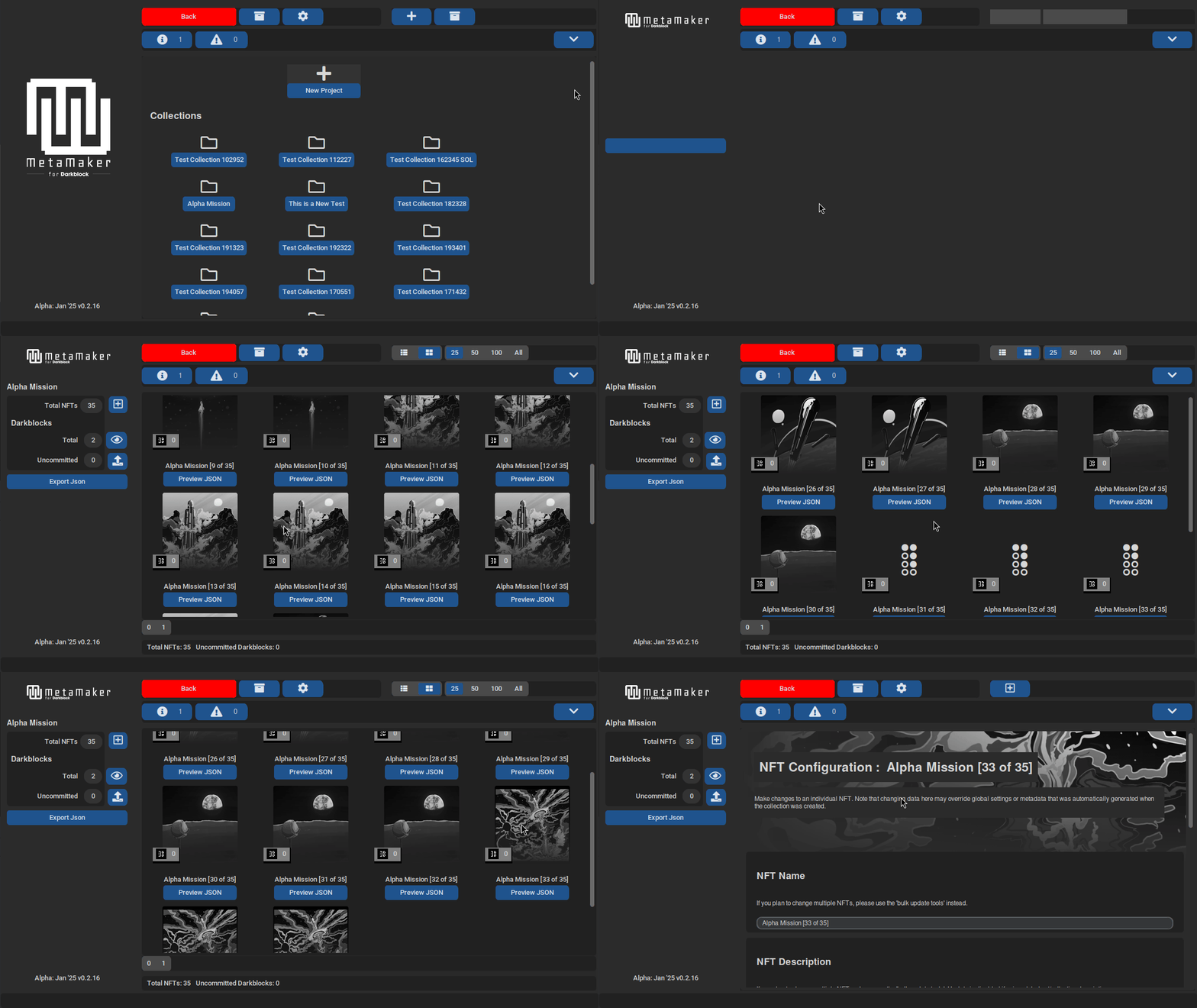
MetaMaker’s gallery loading, demonstrating dynamic rendering and pagination powered by the SetViewMvc class.
Takeaway:
MVC makes adding a feature like a new view as simple as slotting in a piece – no tangled code.
Controller Layer: Navigation
Controllers mediate navigation, such as directing users to the configuration view:
1
2
3
4
5
6
7
8
9
10
11
12
13
14
15
class SetViewControllerMvc(BaseControllerMvc, SetViewObsvProtocol):
    def on_json_preview_selected(self, nft_uid: int):
        self._nav_manager.nm_init_json_view(
            nft_uid,
            self._set_accessor.get_current_set_id(),
            as_top_level=True,
        )

    @override
    def on_item_selected(self, item_id: int, image_path: str):
        self._nav_manager.nm_init_config_nft_view_from_item(
            item_id,
            self._set_accessor.get_current_set_id(),
            image_path
        )
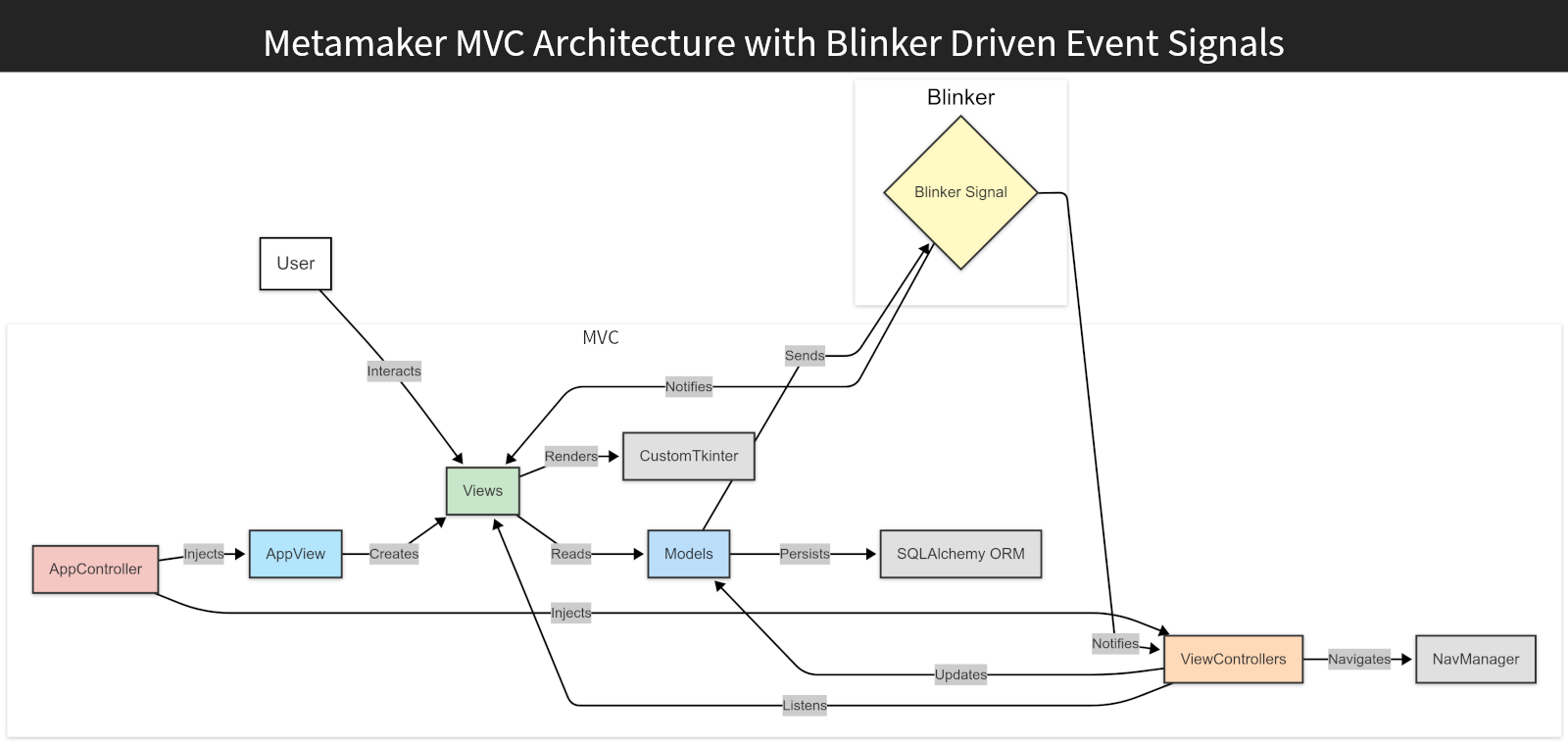
MetaMaker MVC and Blinker architecture: AppController injects dependencies into AppView and the view controllers. Views like SetViewMvc render UI via CustomTkinter, while Blinker signals decouple updates.
Building an Event-Driven System with Blinker
To decouple components, I needed an event-driven system for UI updates – like refreshing after Darkblock transactions7. Custom listeners (RepoEvent) caused complexity early on, so I switched to Blinker.
Triggering Signals
Signals are fired from functions, such as associating an NFT with a Darkblock:
1
2
3
4
5
6
7
def associate_nft(self, dblock_id: int, nft_id: int):
    """Associate an NFT with a Darkblock by updating nft_id in database."""
    try:
        db.update_item(orm_obj=Darkblock, item_id=dblock_id, update_data={"nft_id": nft_id})
        self._on_updated_signal.send(self, dblock_id=dblock_id)
    except Exception as error:
        self._handle_update_error(error, dblock_id=dblock_id)
Handling Signals
Views or controllers register handlers:
1
2
3
4
5
6
7
8
@override
def signal_handlers(self) -> Optional[dict]:
    """Register signal handlers for view/controller updates."""
    return {
        'dblock_manager_on_updated': self._on_dblock_updated_signal,
        'nft_manager_on_updated': self._on_nft_updated_signal,
        'on_nav_intention_created': self._on_nav_intention_signal_received,
    }
Abstracting Signal Management
The SignalHandlerMixin abstracts signal registration so views and controllers manage Blinker signals consistently:
1
2
3
4
5
6
7
8
9
10
11
12
13
14
15
16
17
18
19
class SignalHandlerMixin:
    def register_signal_handlers(self):
        """Register Blinker signal handlers defined in signal_handlers()."""
        if self.signal_handlers():
            for signal_name, handler in self.signal_handlers().items():
                new_signal = signal(signal_name)
                handler_partial = functools.partial(handler)
                self._registered_signals[new_signal] = handler_partial
                new_signal.connect(handler_partial)

    def signal_handlers(self) -> Optional[dict]:
        """Return a dict of signals and their handler functions, e.g. {'signal': self.on_signal}."""
        return None

    def unregister_signal_handlers(self):
        """Unregister all signal handlers."""
        for signal, handler in self._registered_signals.items():
            signal.disconnect(handler)
        self._registered_signals = {}
The payoff: adding a new signal handler is now a one-line entry in signal_handlers() – no manual .connect()/.disconnect() bookkeeping anywhere else in the class. See the full implementation in MetaMaker’s repo.
Takeaway:
Blinker, paired with the SignalHandlerMixin, meant a new subscriber never has to touch the emitter’s code, and teardown is a single unregister_signal_handlers() call instead of hunting down every .connect().
Manual Dependency Injection for Flexibility
To keep MetaMaker extensible, I used manual dependency injection rather than a DI library, keeping control over how components were wired.
Example: Initialising a View
The AppController injects dependencies for the create-set view:
1
2
3
4
5
6
7
8
9
10
11
12
13
14
15
@override
def nm_init_create_set_view(self):
    """Initialize and set up the create set view, pausing the active view."""
    self._pause_active_view()
    create_set_controller = CreateSetControllerMvc(
        set_manager=self._set_manager,
        nft_manager=self._nft_manager,
        nav_manager=self,
    )
    CreateSetControllerMvc.class_id += 1
    create_set_view = self._app_view.init_create_set_view(
        col_accessor=self._collection_manager,
        set_accessor=self._set_manager,
    )
    self._start_as_active_mvc(create_set_controller, create_set_view)
Why manual DI? It offers explicit control, which avoids premature abstraction and simplifies debugging, at the cost of some boilerplate.
Takeaway:
Manual DI gave me flexibility and a clear view of MetaMaker’s wiring, with a known upgrade path to a DI library once the boundaries stabilised.
Supporting Persistence with SQLAlchemy
SQLAlchemy’s ORM balanced abstraction against simplicity for database access. Here is an example from CollectionManager:
1
2
3
4
5
6
7
8
9
10
11
12
13
14
class CollectionManager:
    def __init__(self):
        self._collection_id = None
        self._collection = NftMetadataCollection()
        self._on_updated_signal = signal("collection_manager_on_updated")

    def get_collection_traits(self):
        query = (
            select(Trait)
            .select_from(NftMetadataCollection)
            .join(NftMetadataCollection.traits)
            .where(NftMetadataCollection.id == self._collection_id)
        )
        return db.read_database(query)
Challenge: an out-of-date course initially had me writing legacy SQLAlchemy queries. Making the switch to 2.0 streamlined persistence. The lesson: always check the official documentation and web site.
Takeaway:
SQLAlchemy’s ORM meant most database access was a few lines of Python instead of hand-written SQL. From there the repositories could mediate every write without extra boilerplate.
Lessons Learned and Reflections
MetaMaker refined my architectural planning, building on my Java-Android experience as I learned Python’s ecosystem. Modular design streamlined component development and refactoring. While debugging was a real challenge, tackling it systematically made all the difference. For all the self-doubt along the way, MetaMaker stands as a record of how my architectural thinking evolved – a project I am still glad to share.
MetaMaker – Next Steps
For the full picture on this project, read the MetaMaker case study, or browse the code on GitHub.
Or, since you have read this far – a choice:
Let’s Connect
If you are interested in event-driven Python architecture, MVC desktop apps, or drawing clean boundaries in small codebases, I’d be glad to hear from you.
Prefer to email me directly? hello@lundie.io
Thanks – your message is on its way. I'll get back to you soon.
Something went wrong sending that. Please try again, or email me directly at hello@lundie.io.
-
Darkblock is a service for attaching encrypted, unlockable content to digital assets. ↩
-
Event-Driven Programming is a design pattern where components react to events; Blinker is a Python library that enables this through signals. ↩
-
Dependency Injection is a design pattern where dependencies are passed into objects, improving modularity and testability. ↩
-
MVC (Model-View-Controller) is a design pattern that separates an application into Models (data), Views (UI) and Controllers (logic) for better organisation. ↩
-
CustomTkinter is a modern, customisable Python UI library based on the Tkinter GUI library. ↩ ↩2
-
SQLAlchemy is a Python library for working with databases; its ORM (Object-Relational Mapping) maps database tables to Python objects for easier data management. ↩
-
Darkblocks are units of encrypted, unlockable content attached to a digital asset, created via the Darkblock API (see footnote 1). ↩