Introduction
When building MetaMaker – a cross-platform desktop app for managing file metadata and Darkblock upload workflows – I prioritised a responsive UI, even during demanding tasks like image processing and batch API uploads.
Coming from a Java-Android background, this was also a chance to get hands-on with Python’s threading model1. I learn best by building, and with Tkinter2 powering the GUI, it offered both a real challenge and a way to tackle performance problems head-on.
Here is how I built a custom thread pool wrapper to keep MetaMaker’s interface fluid and responsive.
The Challenge
Tkinter, the backbone of MetaMaker’s CustomTkinter interface, runs on the main thread. Long-running tasks – image processing such as resizing, and API uploads – blocked the UI, causing delays of several seconds. Worse, Tkinter’s lack of thread safety meant worker thread updates could crash the app. This was a barrier to scaling MetaMaker for batch workflows and large asset uploads.
Takeaway:
To create a smooth user experience it was clear MetaMaker required threading from day one. The implementation needed to be thread-safe, lightweight and specifically tailored for Tkinter.
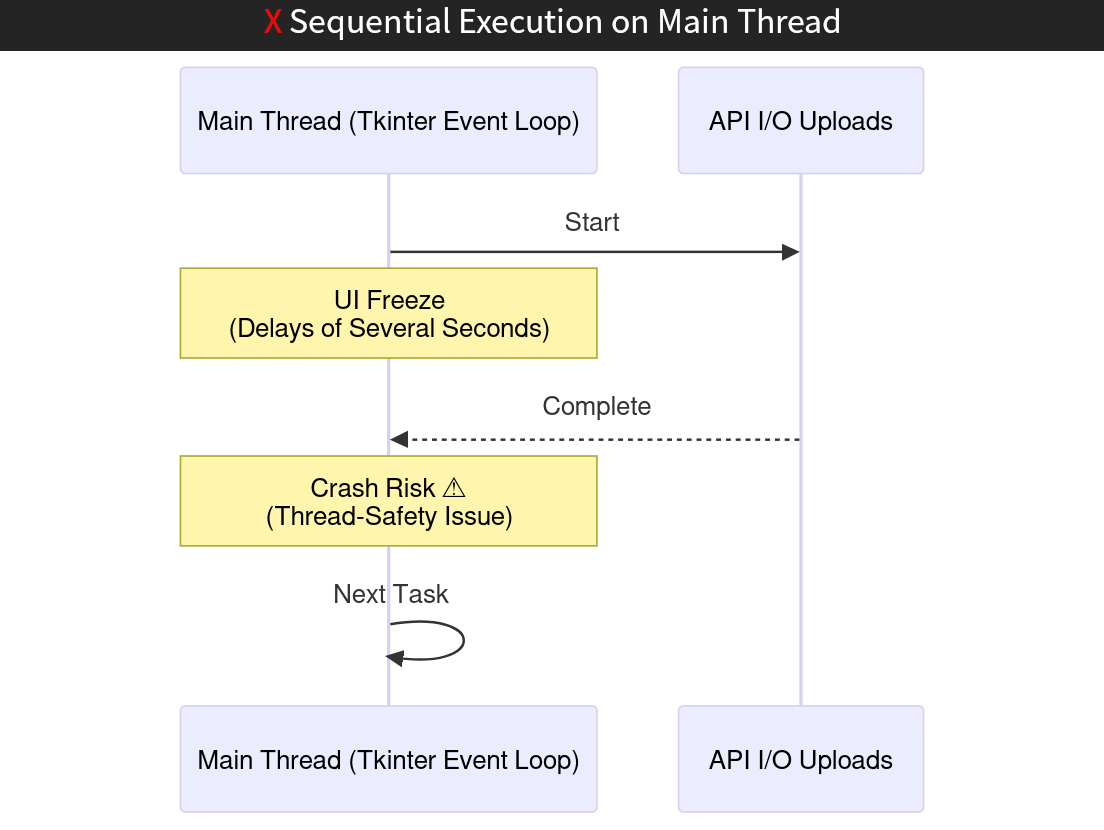
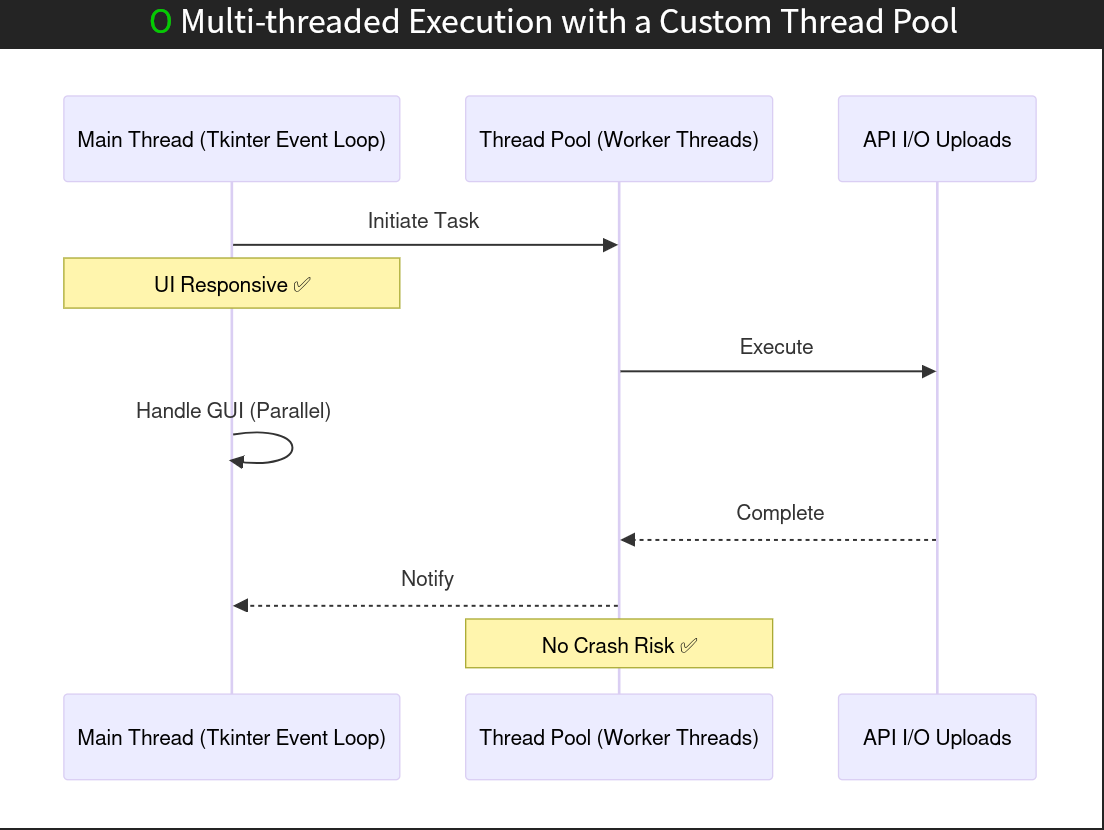
Sequence diagram: sequential execution (left) blocks the main thread during tasks like API uploads, while multi-threaded execution (right) offloads tasks to worker threads.
The Solution: A Custom Thread Pool
I reached for the familiar tools first. Python’s asyncio3 conflicted with Tkinter’s mainloop4 and could not help with CPU-bound tasks like image resizing. multiprocessing5 enabled true parallelism, but its overhead – separate memory spaces and inter-process communication – was unnecessary for MetaMaker’s needs. ThreadPoolExecutor6 offered basic threading but lacked fine-grained control over task scheduling and callbacks.
To get the behaviour I needed, I built a ThreadPoolManager7: a custom wrapper around ThreadPoolExecutor, paired with a thread-safe work queue8 and a listener system for result handling and UI updates. This gave me:
- Precise control over task scheduling and concurrency limits
- Safe UI updates through listener-based callbacks and event signals (using Blinker9)
- Room for future enhancements, such as task prioritisation or retries
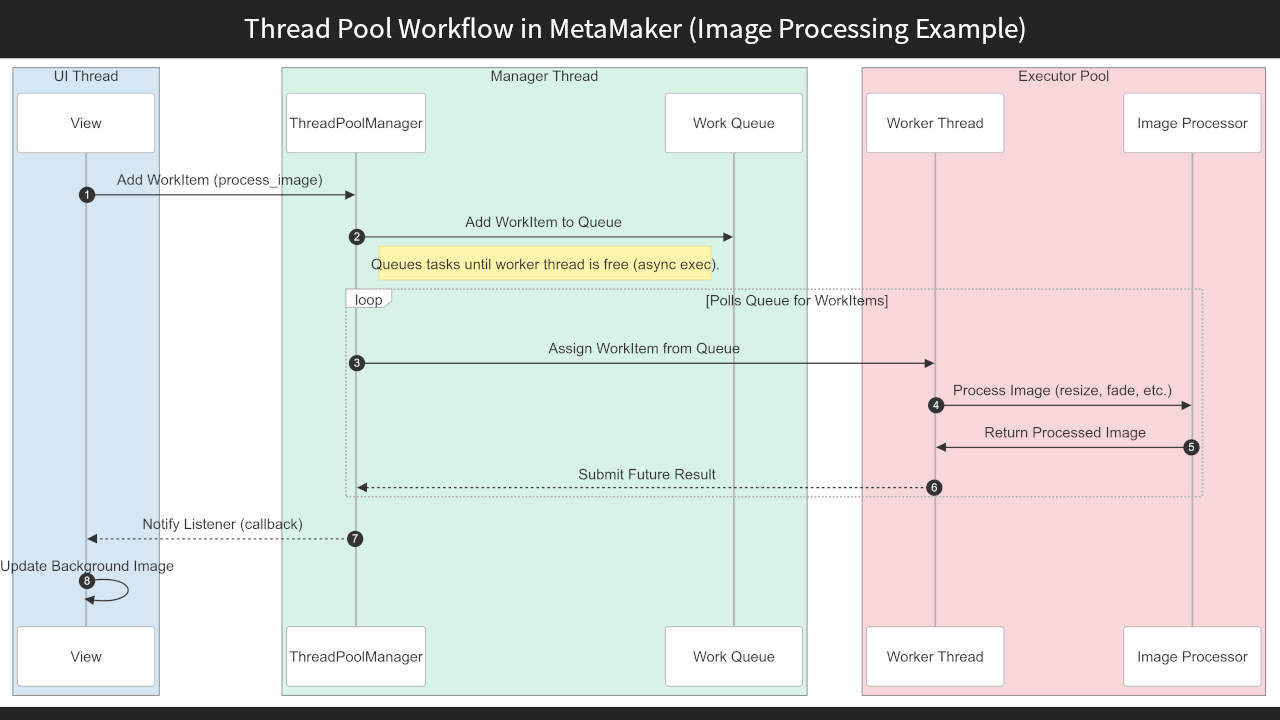
Sequence diagram: how a typical background task – such as image processing – moves through this architecture, from the view layer to the worker thread and back to the UI.
1
2
3
4
5
6
7
8
9
10
11
12
13
14
15
16
17
18
19
20
21
22
23
24
25
26
27
class ThreadPoolManager:
    def __init__(self, max_threads=3):
        self._is_running = True
        self.max_threads = max_threads
        self.work_queue = Queue()                # stdlib queue.Queue
        self.queue_lock = threading.Lock()       # guards queue access
        self._pool: ThreadPoolExecutor = None
        self._listeners = []
        # A dedicated manager thread owns the executor and drains the queue
        self.threaded_manager = threading.Thread(target=self.manager, args=(self.callback,))
        self.threaded_manager.start()

    def manager(self, callback):
        with ThreadPoolExecutor(max_workers=self.max_threads) as self._pool:
            while self._is_running:
                try:
                    with self.queue_lock:
                        task: WorkItem = self.work_queue.get_nowait()
                    future = self._pool.submit(task.work)
                    future.tag = task.tag                # tag rides along for routing
                    future.add_done_callback(callback)
                except queue.Empty:
                    time.sleep(0.2)                      # poll; a Condition would be leaner

    def add_task(self, work_item: WorkItem):
        with self.queue_lock:
            self.work_queue.put(work_item)
The ThreadPoolManager wraps ThreadPoolExecutor, adding a thread-safe queue and a listener system.
Takeaway:
Extending ThreadPoolExecutor with a custom wrapper provided the control MetaMaker’s threading challenges demanded.
This kept Tkinter’s main thread free for GUI updates while worker threads handled the heavy lifting, sidestepping Tkinter’s threading limitations with a lightweight, tailored solution.
Implementation Details
The ThreadPoolManager coordinates tasks through its custom wrapper around ThreadPoolExecutor. A thread-safe work queue (a queue.Queue guarded by a lock) stores incoming tasks, and a listener system manages result processing and UI updates.
Here is how it works for uploading Darkblocks10 (encrypted, unlockable content):
- The
DblocksViewController11 triggers amint_darkblock12 task. - The task is added to the work queue and executed asynchronously by a worker thread.
- The worker notifies a listener (
DblockServiceAsync13), which forwards aDblockServicePacket14 to theDarkblockManager15. - The manager updates the database – e.g. storing a transaction ID – and emits a Blinker signal:
dblock_manager_on_updated. - The UI (
DblocksView16) receives this signal throughDblockListViewMixin17 and updates the Darkblock list on the main thread, preservingTkinterthread safety.
View and controller components register as ThreadPoolListeners18 to drive live progress bars and status updates, giving real-time feedback during tasks like uploads.
To prevent race conditions under high load – such as uploading 100 Darkblocks at once – a threading.Lock19 guards the work queue. Without it, concurrent writes could drop tasks. A dedicated manager thread polls the work queue to dispatch tasks to the thread pool, though this polling could be optimised with a threading.Condition20 to reduce CPU overhead.
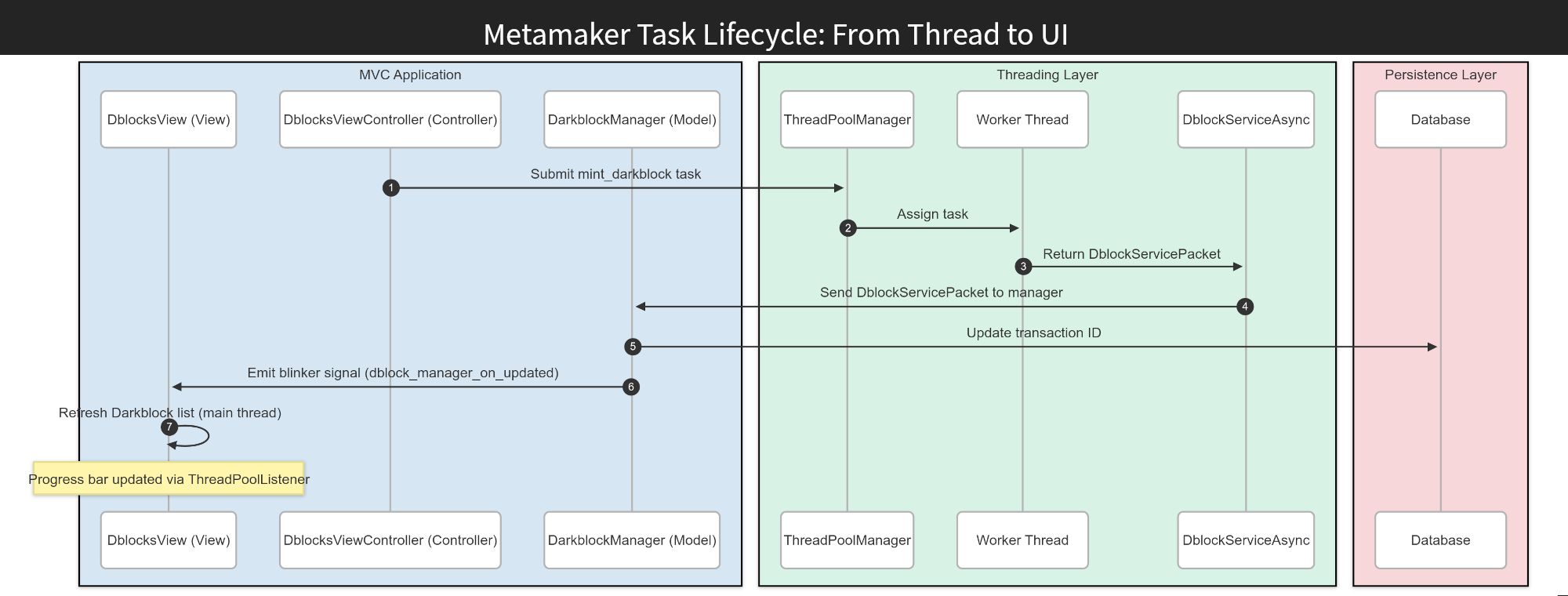
Sequence diagram: a Darkblock task flows from the UI controller to the thread pool, then through worker threads, service listeners and the manager. Database updates trigger Blinker signals, which update the UI safely on the main thread – keeping MetaMaker responsive throughout the upload.
Why Not Just Use a Library?
I considered libraries like celery21 and extending concurrent.futures22, but I wanted full control over thread lifecycle, queue strategy and UI-safe callbacks. Building my own manager kept things lightweight and easier to debug.
The other reason was educational. My previous multithreading experience came from Java-Android, so building this from scratch in Python was a practical way to deepen my understanding while solving real performance problems.
Takeaway:
Reaching for a library would have hidden the very control – and learning – I was after.
Lessons Learned
Exploring asyncio, ThreadPoolExecutor and multiprocessing taught me how to navigate Tkinter’s threading limitations and the trade-offs of concurrency in GUI apps.
- Threading with
Tkinteris tricky. You have to be meticulous about which thread touches the UI. - More control means less confusion. Owning the thread pool meant fewer surprises and more predictable behaviour.
- Debugging multithreading is a different beast. Logging and visual debugging were invaluable when chasing rare issues.
- Custom isn’t always overkill. Sometimes building exactly what you need is the right call.
Real-World Impact
With the thread pool in place, uploading a batch of 100 Darkblocks no longer blocked the interface: the window stayed interactive while worker threads did the work, where the same upload on the main thread would freeze MetaMaker for seconds at a time. Progress bars and status text, driven by ThreadPoolListeners, updated live throughout, so users saw the upload advancing instead of a frozen window.
Takeaway:
Effective threading directly shapes how an app feels to use.
Conclusion
This custom thread pool keeps MetaMaker’s UI responsive – a cornerstone of the app despite Tkinter’s constraints.
MetaMaker – Next Steps
For the full picture on this project, read the MetaMaker case study, or browse the code on GitHub.
Or, since you have read this far – a choice:
Let’s Connect
If you are interested in concurrency, responsive desktop UIs, or threading patterns in Python, I’d be glad to hear from you.
Prefer to email me directly? hello@lundie.io
Thanks – your message is on its way. I'll get back to you soon.
Something went wrong sending that. Please try again, or email me directly at hello@lundie.io.
-
Multithreading allows multiple tasks to run concurrently, improving responsiveness in applications like MetaMaker. ↩
-
CustomTkinter is a modern, customisable Python UI library based on the Tkinter GUI library. ↩
-
asyncio is a Python library for writing asynchronous code using an event loop, but it is not ideal for CPU-bound tasks or Tkinter’s main thread. ↩
-
mainloop is the event loop in Tkinter that processes GUI events, requiring all UI updates to occur on the main thread. ↩
-
multiprocessing is a Python module for true parallelism using separate processes, but its overhead makes it unsuitable for MetaMaker’s lightweight threading needs. ↩
-
ThreadPoolExecutor is a Python class in the concurrent.futures module for managing a pool of threads, offering basic threading but lacking advanced control. ↩
-
ThreadPoolManager is a custom class I built to manage a pool of worker threads, keeping the UI responsive during background tasks. ↩
-
The work queue is a standard
queue.Queue, guarded by athreading.Lockand drained by a dedicated manager thread that dispatches tasks to the thread pool. ↩ -
Event-Driven Programming is a design pattern where components react to events; Blinker is a Python library that enables this through signals. ↩
-
Darkblock is a service for attaching encrypted, unlockable content to digital assets. ↩
-
DblocksViewController is a custom controller class that initiates Darkblock-related tasks, such as minting, in the MetaMaker UI. ↩
-
mint_darkblock is a custom task function that handles the creation of Darkblocks, executed asynchronously by worker threads. ↩
-
DblockServiceAsync is a custom listener class that processes asynchronous Darkblock task results and forwards them to the DarkblockManager. ↩
-
DblockServicePacket is a custom data structure used to encapsulate Darkblock task results for safe transmission between components. ↩
-
DarkblockManager is a custom manager class responsible for updating the database with Darkblock transaction data and emitting signals. ↩
-
DblocksView is a custom UI component that displays the list of Darkblocks and updates it based on signals from the DarkblockManager. ↩
-
DblockListViewMixin is a custom mixin class that enables DblocksView to handle Blinker signals and update the UI safely on the main thread. ↩
-
ThreadPoolListeners are custom callback interfaces that let MetaMaker components receive updates from worker threads, enabling real-time UI feedback. ↩
-
threading.Lock is a Python synchronisation primitive that prevents race conditions by allowing only one thread to access a resource at a time. ↩
-
threading.Condition is a Python synchronisation primitive that lets threads wait for or notify specific conditions, optimising queue polling. ↩
-
celery is a distributed task queue library in Python, useful for complex workflows but overkill for MetaMaker’s threading needs. ↩
-
concurrent.futures is a Python module providing high-level interfaces for asynchronous execution, including ThreadPoolExecutor, but lacking fine-grained customisation. ↩